Your window installer website gets tons of traffic. But here's the problem: most visitors leave within seconds. They can't find your phone number. Your site takes forever to load. The contact form won't work on their phone.
Mobile users make up over 55% of traffic to contractor websites. If your window installer website isn't mobile-optimized, you're losing leads to competitors. Every day.
Mobile website optimization fixes this problem. It makes your site fast, easy to use, and conversion-focused on all devices. The result? More phone calls, more leads, more jobs.
This guide shows you exactly how to optimize your window installer website for mobile users. You'll learn the essential techniques that convert mobile visitors into paying customers.
What You'll Learn
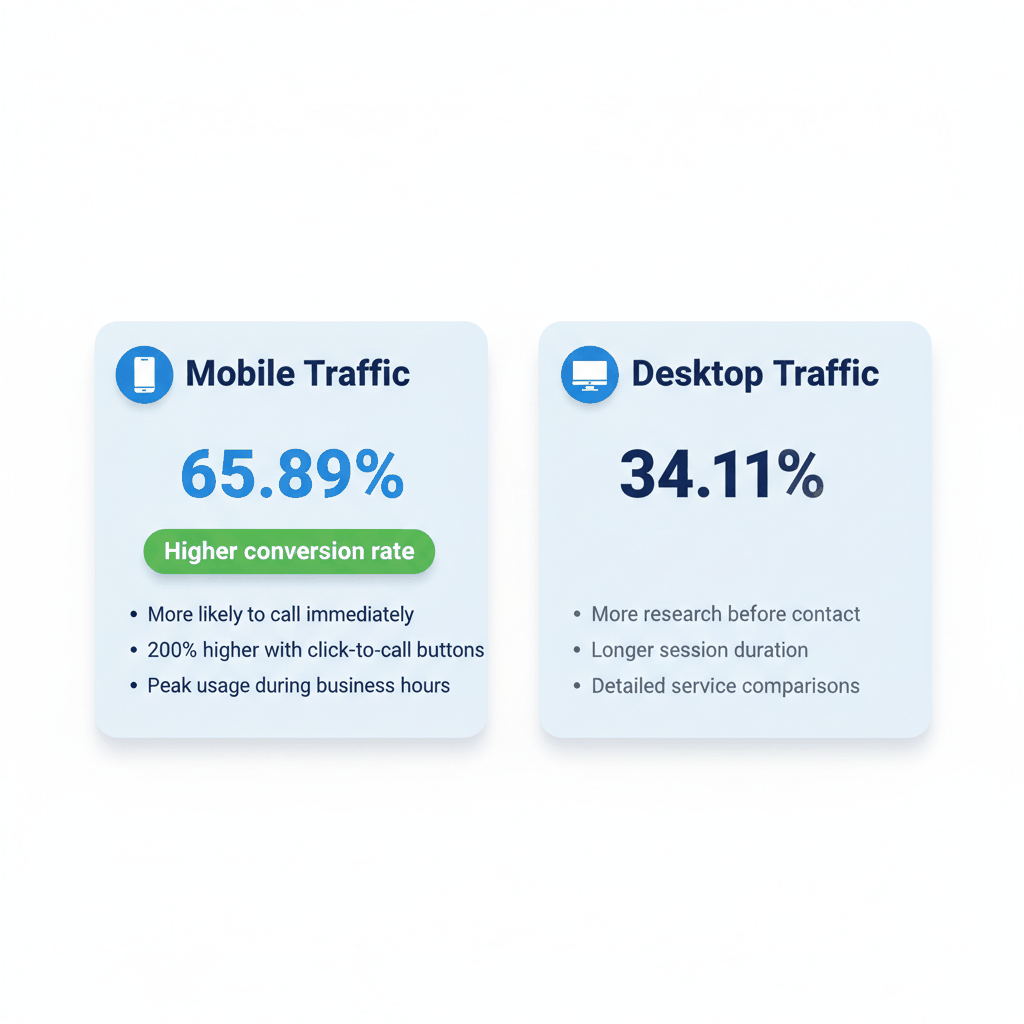
Mobile searches now make up 65.89% of searches. That means most people looking for window installation services find you on their phone first.
Google uses mobile-first indexing for all websites. Your mobile site determines your search rankings. If it's slow or broken, you'll rank lower than competitors with optimized mobile sites.
Here's what matters most: mobile users want instant results. They need your phone number visible. They want fast loading pages. They expect easy navigation.
Window installers with mobile-optimized websites see up to 67% higher conversion rates. That's because mobile optimization removes friction from the user experience.
Homeowners search for window installers differently on mobile devices. They're often standing in their home, looking at old windows. They want immediate help.
Mobile users are more likely to call immediately. Desktop users research more before contacting. This means your mobile site needs prominent phone numbers and click-to-call buttons.
The typical mobile user journey looks like this: search on phone, visit your site, call immediately or bookmark for later. Make that first impression count.
Most window installer websites struggle with the same mobile problems. Understanding these challenges helps you fix them faster.
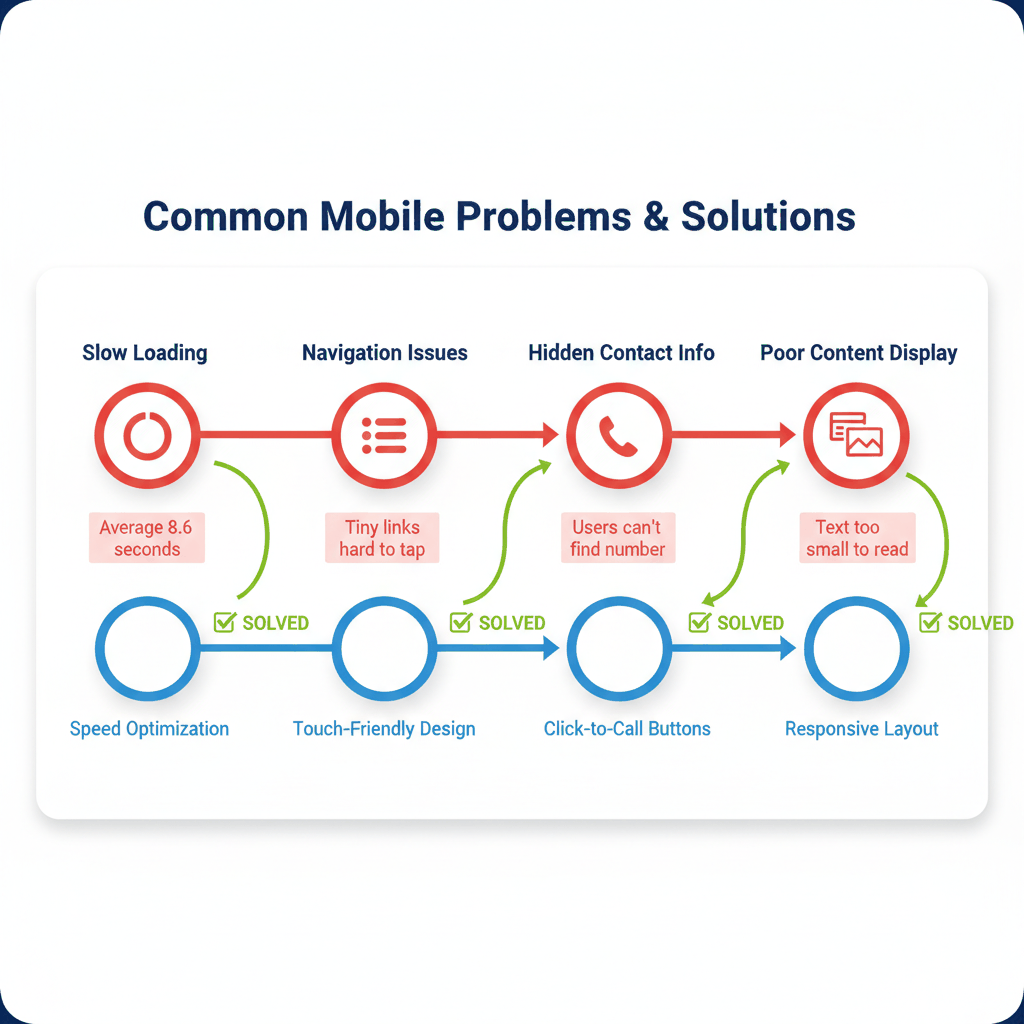
The average mobile site takes 8.6 seconds to load completely. But 53% of users leave sites that take more than 3 seconds. That's a massive problem.
Large images cause most speed problems. Contractor websites often use high-resolution before-and-after photos. These look great but kill mobile performance.
Unoptimized code also slows sites down. Many contractor websites use bloated themes with unnecessary features. Every unused feature adds loading time.
Desktop navigation menus don't work on small screens. Tiny links are hard to tap. Drop-down menus disappear when users scroll.
Contact information gets buried in complex menus. Mobile users need your phone number visible immediately. They won't hunt through multiple pages.
Form completion becomes frustrating on mobile. Long forms with small text fields discourage submissions. Auto-correct interferes with address entry.
Text that's readable on desktop becomes microscopic on mobile. Users zoom in and out constantly. This creates a poor user experience.
Images don't resize properly. They extend beyond screen width or appear distorted. Gallery photos become impossible to view clearly.
Call-to-action buttons disappear below the fold. Users can't see your primary conversion elements without scrolling extensively.
Speed determines whether mobile visitors stay or leave your window installer website. Here's how to make your site lightning-fast on all devices.
Aim for these mobile speed targets:
Page loading under 3 seconds completely
First byte response under 1.3 seconds
Total page size under 500 KB
Fewer than 50 individual content pieces
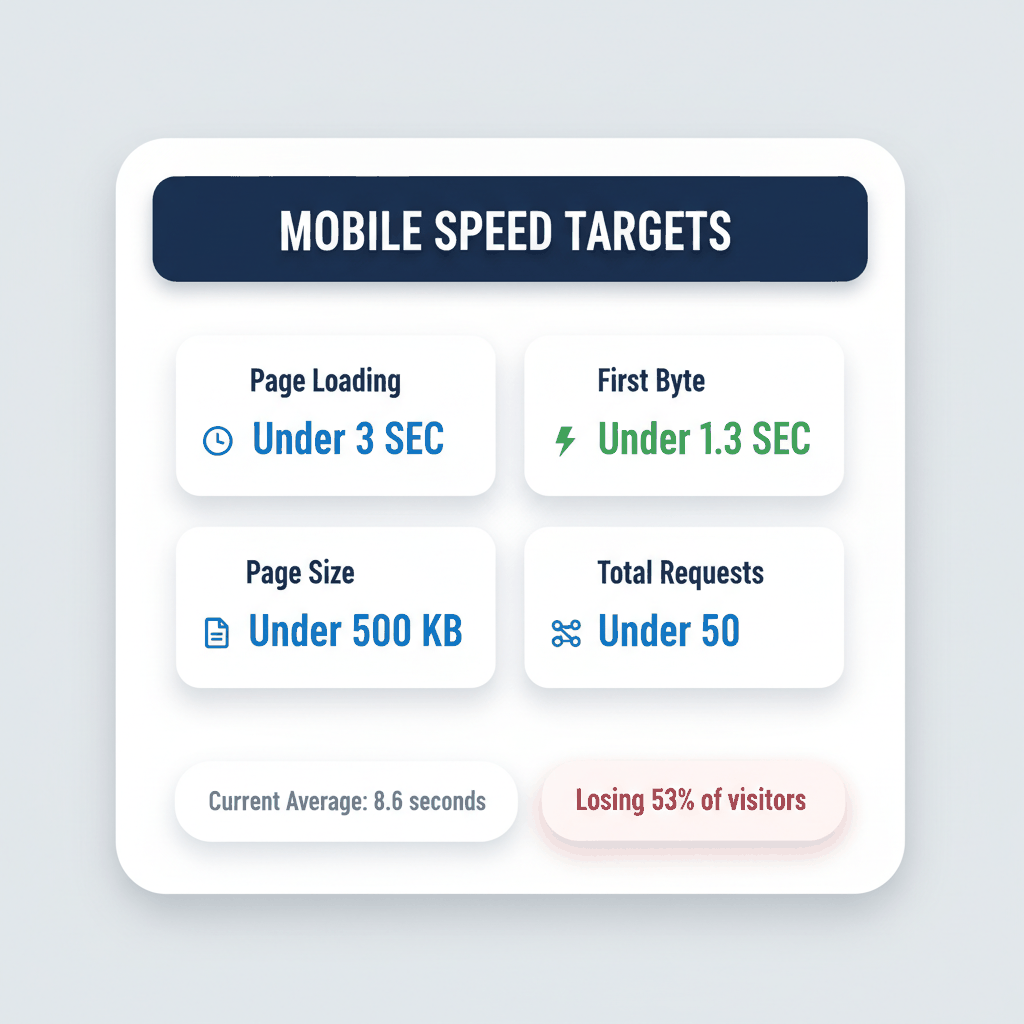
Use PageSpeed Insights to test your current performance. Always check the mobile tab for accurate results.
Companies that improve loading by just 0.1 seconds see 8.6% more page views. Small improvements create big results.
Large images kill mobile performance. Compress all photos before uploading. Use tools like TinyPNG or built-in WordPress compression.
Choose the right image format. Use WebP for photos when possible. PNG works for graphics with few colors. JPEG handles complex photos well.
Implement lazy loading for image galleries. Photos load only when users scroll to them. This dramatically improves initial page speed.
Create mobile-specific image sizes. Serve smaller images to mobile devices automatically. Your desktop images don't need to load on phones.
Enable GZIP compression on your server. This reduces file sizes by up to 70% during transfer. Most hosting providers offer this feature.
Minify CSS and JavaScript files. Remove unnecessary spaces, comments, and code. This creates smaller, faster-loading files.
Eliminate unused plugins and themes. Each inactive plugin still loads code. Clean installations perform better than cluttered ones.
Use browser caching for repeat visitors. Store common files locally on user devices. Return visits load much faster with proper caching.
Responsive design makes your window installer website work perfectly on all screen sizes. Here's how to implement it correctly.
Start designing for mobile screens first. Then expand the design for larger screens. This ensures mobile users get the best experience.
Prioritize essential content on mobile layouts. Phone numbers, service areas, and contact forms need prominent placement. Secondary content can wait.
Use single-column layouts on mobile. Side-by-side content becomes hard to read on small screens. Stack elements vertically instead.
Design touch targets at least 44x44 pixels in size. Smaller buttons frustrate mobile users. They'll accidentally tap wrong elements.
Add plenty of white space around clickable elements. This prevents accidental taps on adjacent links or buttons.
Make forms mobile-friendly with large input fields. Use appropriate keyboard types for phone numbers and email addresses. This improves user experience.
Use hamburger menus for mobile navigation. Keep the main menu hidden until users need it. This saves valuable screen space.
Limit menu items to essential pages only. Services, contact, about, and gallery pages matter most. Too many options overwhelm mobile users.
Create sticky navigation elements. Keep important links visible as users scroll. Phone numbers and contact buttons work well as sticky elements.
Click-to-call buttons can increase conversion rates by 200% for contractor websites. Here's how to implement them effectively.
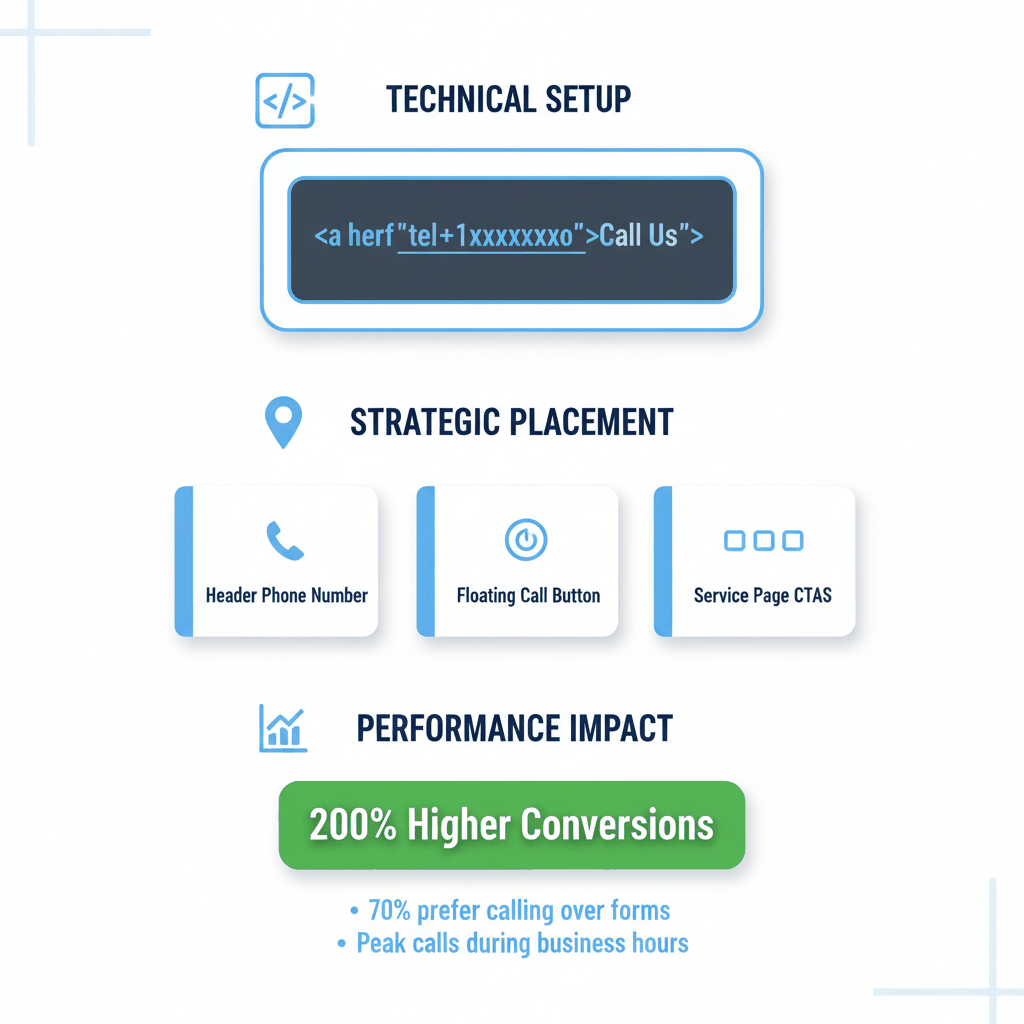
Add click-to-call functionality with simple HTML code. Use this format for your phone numbers:
Implementation guide shows the exact code: href="tel:1xxxxxxxxxx" with your full phone number including area code.
Include analytics tracking with your click-to-call links. This helps measure which pages generate the most phone calls.
Test click-to-call functionality on different devices. iPhones, Android phones, and tablets may behave differently.
Place click-to-call buttons prominently in your website header. This makes your phone number visible on every page.
Add floating call buttons that stay visible during scrolling. Position them in the bottom-right corner where thumbs naturally rest.
Include multiple click-to-call opportunities throughout long pages. Service pages and project galleries need call buttons at the bottom.
Mobile users prefer calling over form submission. Research shows 70% of mobile visitors choose phone calls when contacting businesses.
Peak calling times occur during business hours and weekends. Ensure your click-to-call buttons work consistently during high-traffic periods.
Emergency services generate immediate calls. Window replacement for broken glass creates urgency that leads to instant phone contact.
Google's mobile-first indexing means your mobile site determines search rankings. Here's how to optimize for mobile search success.
Google completed the transition to mobile-first indexing in July 2024. Your mobile site now determines rankings for all searches.
Ensure content parity between desktop and mobile versions. Don't hide important content on mobile. Google can't rank content it can't see.
Use structured data markup on mobile pages. This helps Google understand your services, location, and contact information.
Mobile searches are three times more likely to be local. Optimize for "window installation near me" and location-specific searches.
Claim and optimize your Google Business Profile. Add photos, hours, and service descriptions. This appears prominently in mobile search results.
Include location information throughout your mobile site. Service areas, city names, and local landmarks help with local search visibility.
Core Web Vitals directly impact mobile search rankings. Focus on these key metrics:
Largest Contentful Paint under 2.5 seconds
Interaction to Next Paint below 200ms
Cumulative Layout Shift under 0.1
Companies optimizing Core Web Vitals see 18% revenue increases and 50% lower bounce rates.
Use tools like GTmetrix to monitor Core Web Vitals performance. Test regularly and fix issues immediately.
Track the right metrics to understand your mobile optimization success. Here's what matters most for window installer websites.
Monitor mobile traffic percentage in Google Analytics. Window installer websites should see 55-65% mobile traffic typically.
Track mobile bounce rate separately from desktop. Mobile bounce rates above 60% indicate user experience problems.
Measure call conversion rates from mobile traffic. Use call tracking numbers to attribute phone leads to mobile visits.
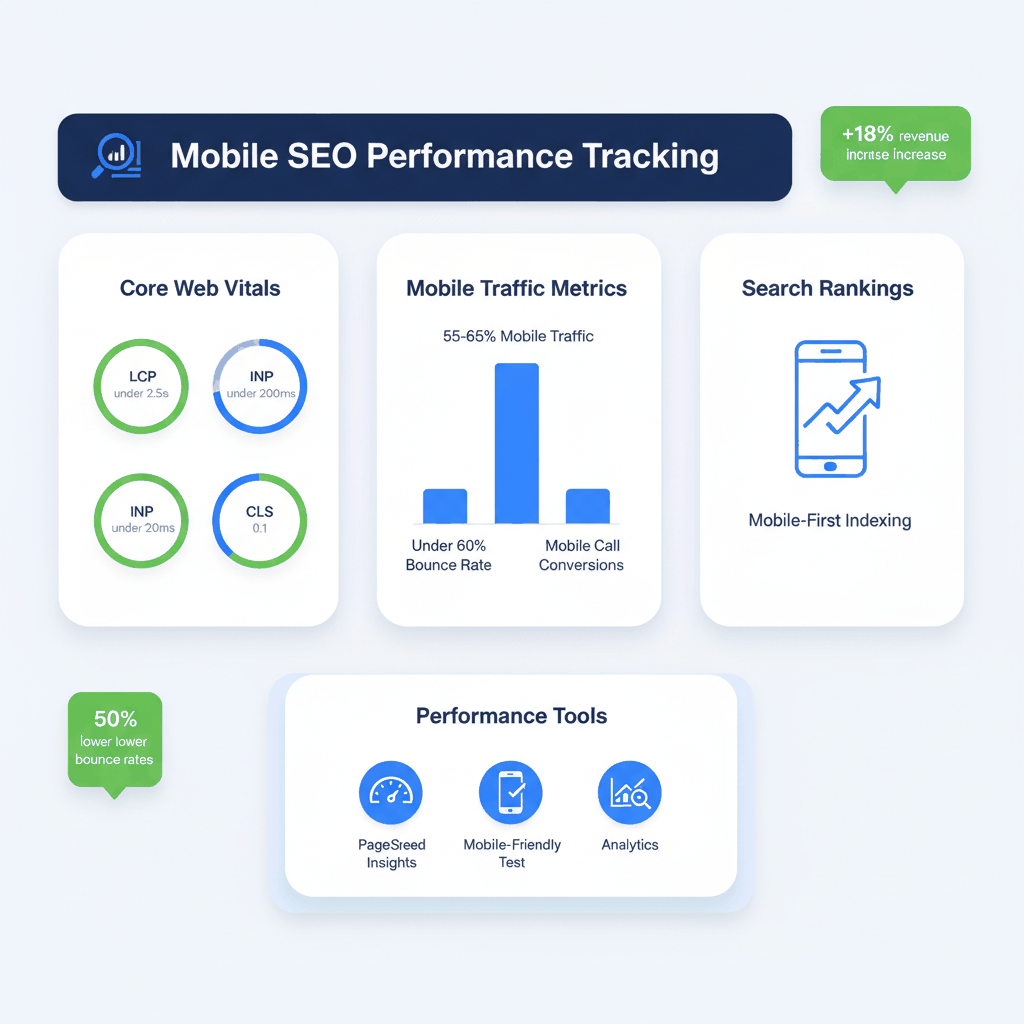
Use Google's Mobile-Friendly Test monthly to identify issues. This catches problems before they impact rankings.
Monitor search rankings separately for mobile devices. Rankings can differ significantly between desktop and mobile results.
Set up mobile-specific conversion goals in analytics. Track form submissions, phone clicks, and quote requests from mobile users.
Review mobile performance metrics monthly. Look for trends in traffic, conversions, and user behavior changes.
Test new features on mobile devices before launching. What works on desktop might create problems on phones.
Stay updated with mobile technology changes. New devices, screen sizes, and browser capabilities require ongoing optimization.
How long does window installer website mobile optimization take?
Basic mobile optimization takes 2-4 weeks for most contractor websites. This includes responsive design implementation, speed optimization, and click-to-call setup. Advanced features like progressive web apps require 6-8 weeks.
What's the cost of mobile website optimization for contractors?
Professional mobile optimization costs $2,000-$8,000 depending on your site's complexity. DIY optimization using tools like lead generation services costs $50-$200 monthly for hosting and tools.
Do I need a separate mobile website for my window installation business?
No, responsive design works better than separate mobile sites. Responsive websites adapt automatically to all screen sizes. They're easier to maintain and better for SEO than separate mobile versions.
How do I know if my contractor website is mobile-friendly?
Use Google's Mobile-Friendly Test tool to check your current site. Test your website on actual mobile devices too. If text is hard to read or buttons are difficult to tap, you need mobile optimization.
Which mobile optimization features matter most for getting leads?
Click-to-call buttons, fast loading speeds, and visible contact information generate the most mobile leads. Focus on these three elements first, then improve forms and navigation for better user experience.
Ready to buy window installation leads? Sign up for free with ResultCalls today!

Hello everyone! My name is Alex and I write these blogs to help educate small business owners on different ways to grow their business. My goal is to make lead generation as easy as possible for you. After reading these blogs, I hope you leave with some actionable steps that will get you closer to growing your business :)