
Does your law firm struggle with missed leads and poor client follow-up? You're not alone.
Law firm CRM adoption has risen to 78% according to industry research. Yet satisfaction rates remain shockingly low. Most firms rate their CRM effectiveness only 5 out of 10.
The problem isn't the technology. It's how law firms implement and use their CRM systems. MVA attorneys face unique challenges when managing client relationships and tracking personal injury cases.
This guide shows you proven strategies that work. Plus common mistakes that cost firms thousands in lost revenue. You'll learn how to choose, implement, and use attorney client management tools that actually boost your bottom line.
What You'll Learn
Here's a shocking statistic. Nearly 35% to 50% of all law firm leads never get followed up with. That should stop every managing partner in their tracks.
The average firm converts only 14% of leads to clients. Meanwhile, combining missed call volume with case values, the average multi-attorney firm loses $200,000+ annually to unanswered calls. Solo practitioners lose $50,000-100,000.
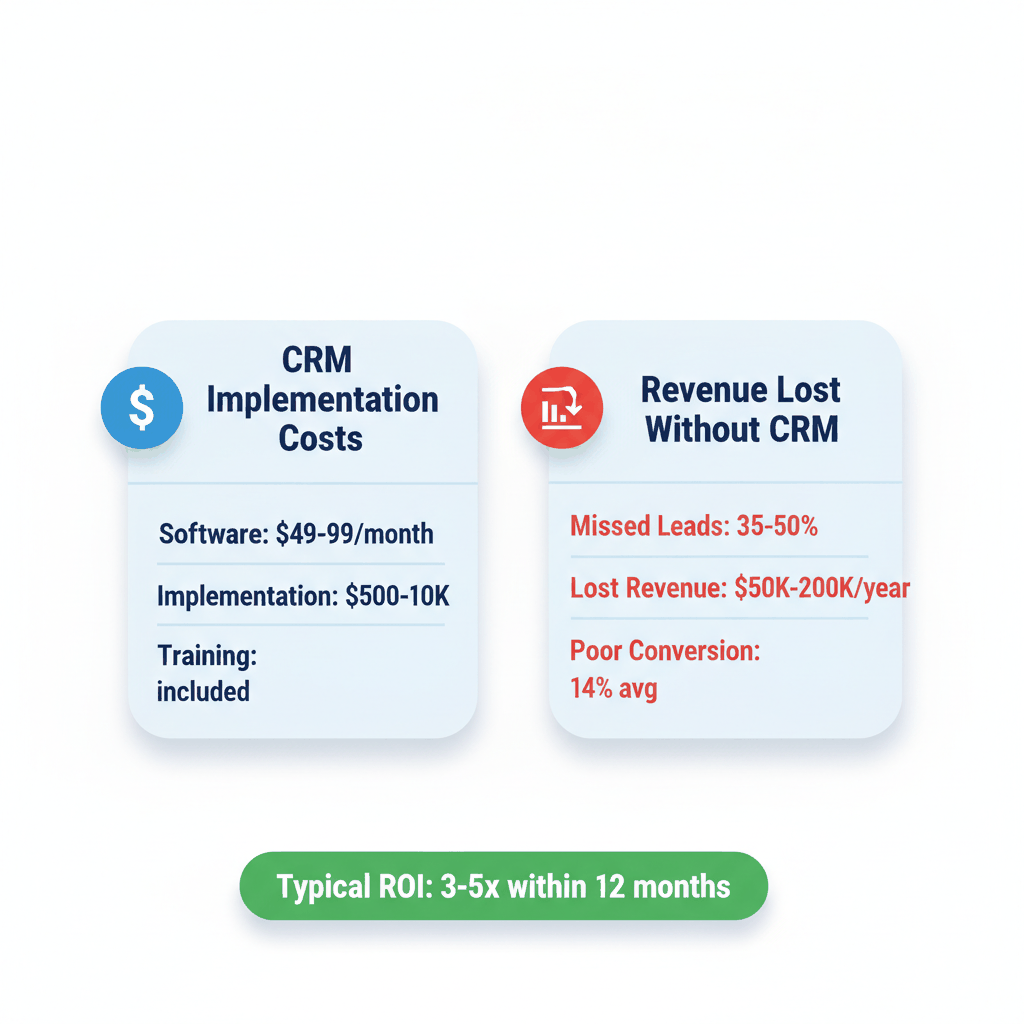
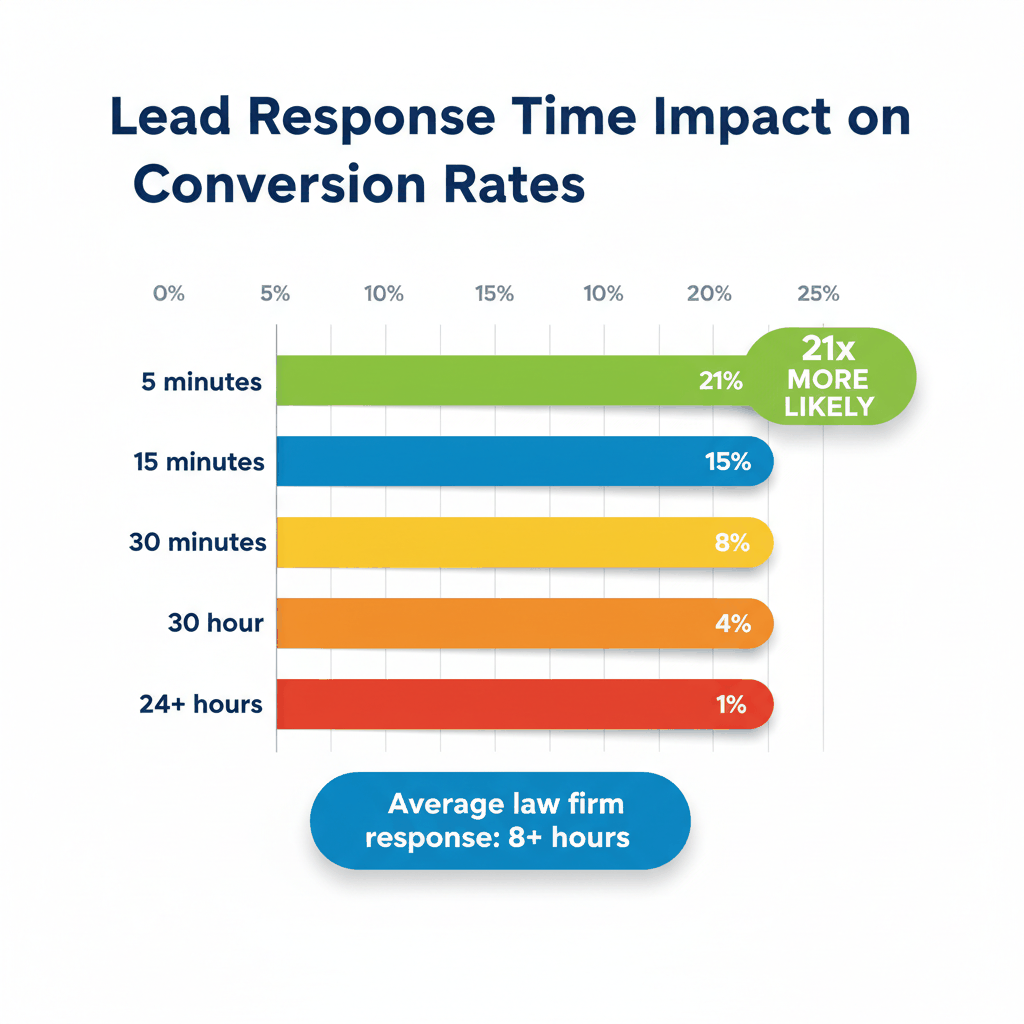
Law firms lose leads in predictable ways. Slow response times average 8+ hours when research shows leads contacted within 5 minutes are 21x more likely to convert.
Missed calls account for 35% that never get responses. Poor follow-up happens when firms have no CRM tracking. Consultation no-shows hit 25-30% without proper scheduling systems.
For example: A personal injury firm gets 100 leads per month. With average case values of $15,000, that's $1.5 million in potential revenue. At 14% conversion, they only capture $210,000. Improving conversion to just 25% would add $165,000 in monthly revenue.
More than 80% of law firms have a CRM solution. Yet fewer than 40% of lawyers use it consistently. This creates expensive problems.
Poor data quality leads to inefficiencies and missed opportunities. Contacts typically come from attorney address books, which are often outdated. It's like buying a gold bucket and filling it with dirty water.
Many attorneys view CRM systems as administrative rather than strategic. They resist modernizing their business development approach. Plus, lack of time remains the biggest barrier to CRM adoption since lawyers' billable hours are at a premium.
Not all CRM systems work for law firms. Generic platforms like Salesforce miss crucial legal-specific features. You need specialized tools that understand your practice.
Choose CRM software built for attorneys. Legal-specific platforms include features like conflict checks, trust accounting, and matter management. They integrate with practice management systems automatically.
Top options include:
Clio Grow for comprehensive CRM and client intake
Lawmatics for personal injury firms needing speed and structure
CASEpeer for turnkey plaintiffs' law firm solutions
MyCase for integrated practice management and CRM
These platforms understand legal workflows. They include built-in compliance features. Plus they offer settlement calculators and medical records management for personal injury cases.
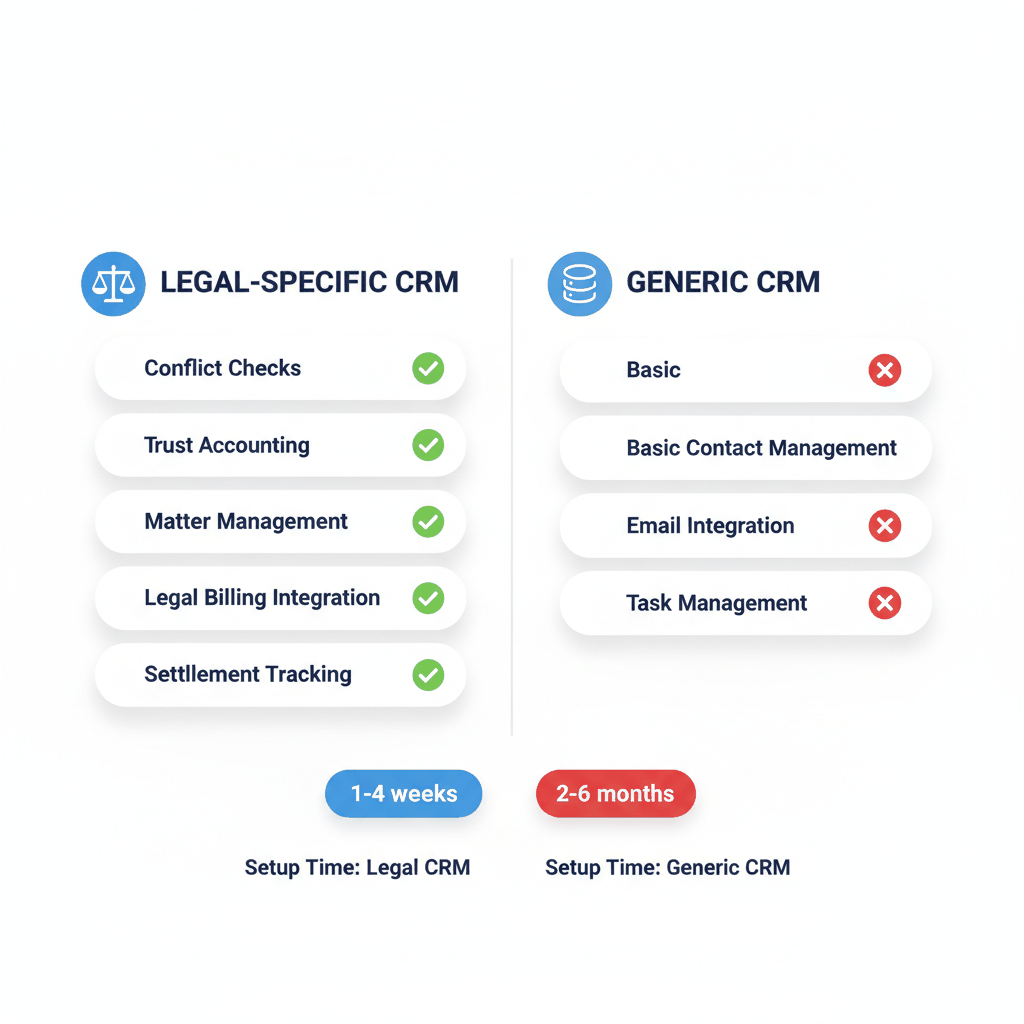
Avoid generic CRM systems that require manual configuration for legal workflows. These platforms won't include conflict checks or trust accounting. They rarely integrate with legal billing systems.
Without integration, you create additional administrative work. Staff must manually create client records when leads sign engagement agreements. An integrated solution creates client records automatically.
Generic CRMs also lack understanding of attorney-client privilege and security requirements. This creates compliance risks that most law firms can't afford.
Legal CRM software pricing ranges from free options to $150+ per user monthly. Most law firms spend between $49-$99 per user per month. Budget for implementation and training costs too.
Simple tools like PracticePanther can be set up in a day. Mid-range platforms like Clio typically take 1-4 weeks for full implementation. Enterprise solutions may require 2-6 months with consultant support.
Remember to calculate ROI based on improved lead conversion. Well-implemented legal CRMs typically deliver 3-5x return through improved lead conversion and reduced intake staffing costs.
Implementation makes or breaks your law firm CRM success. Rushing leads to mistakes. Poor planning creates user resistance. Here's how to do it right.
Firms that start small with clear and attainable goals ensure long-term CRM success. Begin with one practice area or a small team. Set specific, measurable objectives like improving response times or tracking lead sources.
Plan a realistic timeline with buffer for issues. Most CRM implementations take longer than expected. Recognize this upfront and communicate realistic expectations to your team.
For example: Start by tracking new personal injury leads only. Measure response times and conversion rates for 30 days. Then expand to referral tracking and client follow-up systems.
Avoid implementing all CRM features simultaneously. This overwhelms users and reduces adoption rates. Don't migrate all historical data immediately either.
Never skip training because you're eager to start. Inadequate training creates user frustration and resistance. Don't assume attorneys will figure it out on their own.
Trying to customize everything from day one also slows implementation. Start with standard workflows and customize gradually based on actual usage patterns.
The first step in effective CRM management is establishing clear governance. Assign ownership to a dedicated person or team, often within marketing or business development.
This role oversees data entry, cleanup, and user training. Consistent processes create accountability and set the tone for firmwide adoption. Without governance, data quality deteriorates quickly.
Create standard procedures for:
Lead entry and qualification processes
Client information updates and maintenance
Follow-up scheduling and task assignment
Reporting and performance tracking methods
CRMs that integrate with existing workflows and tools increase adoption by minimizing disruption. Your CRM shouldn't operate in isolation.
Integrate with email, calendar, and document management systems. Connect to billing software and external databases. This creates a 360-degree view of clients and prospects.
Email integration lets attorneys log communications automatically. Calendar integration shows client meetings and deadlines. Document integration provides quick access to case files and contracts.
Lead tracking separates successful firms from struggling ones. The difference between 14% conversion and 30% conversion is systematic follow-up and response speed.
You should do everything possible to call every lead within 15 minutes. Responsiveness shows clients you care and helps establish trust. This maximizes conversion likelihood.
Set up automatic lead notifications via text and email. Use round-robin assignment to distribute leads fairly among attorneys. Create escalation procedures for missed calls or delayed responses.
With 40% of legal inquiries arriving outside business hours, consider voice AI or answering services. Studies show the first firm to make contact wins 78% of legal matters.
Not all leads are created equal. Track where your best clients come from. Measure conversion rates by source to optimize your marketing spend.
Common lead sources include:
Google Ads and search marketing campaigns
Referrals from other attorneys and professionals
Website contact forms and live chat
Social media and content marketing efforts
Analyze which sources produce the highest value cases. Focus your marketing budget on channels that deliver quality leads, not just quantity.
Never assume one phone call or email is enough follow-up. Research shows most prospects need 5-7 touchpoints before making decisions. Create systematic follow-up sequences for different lead types.
Don't rely on manual follow-up either. Use automated sequences with personal touches. Schedule calls, send relevant content, and track engagement levels.
Avoid treating all leads the same way too. Personal injury leads need different follow-up than business law prospects. Customize your approach based on practice area and lead urgency.
Personal injury cases require specialized workflow management. From initial intake through settlement, automation streamlines processes and improves client satisfaction.
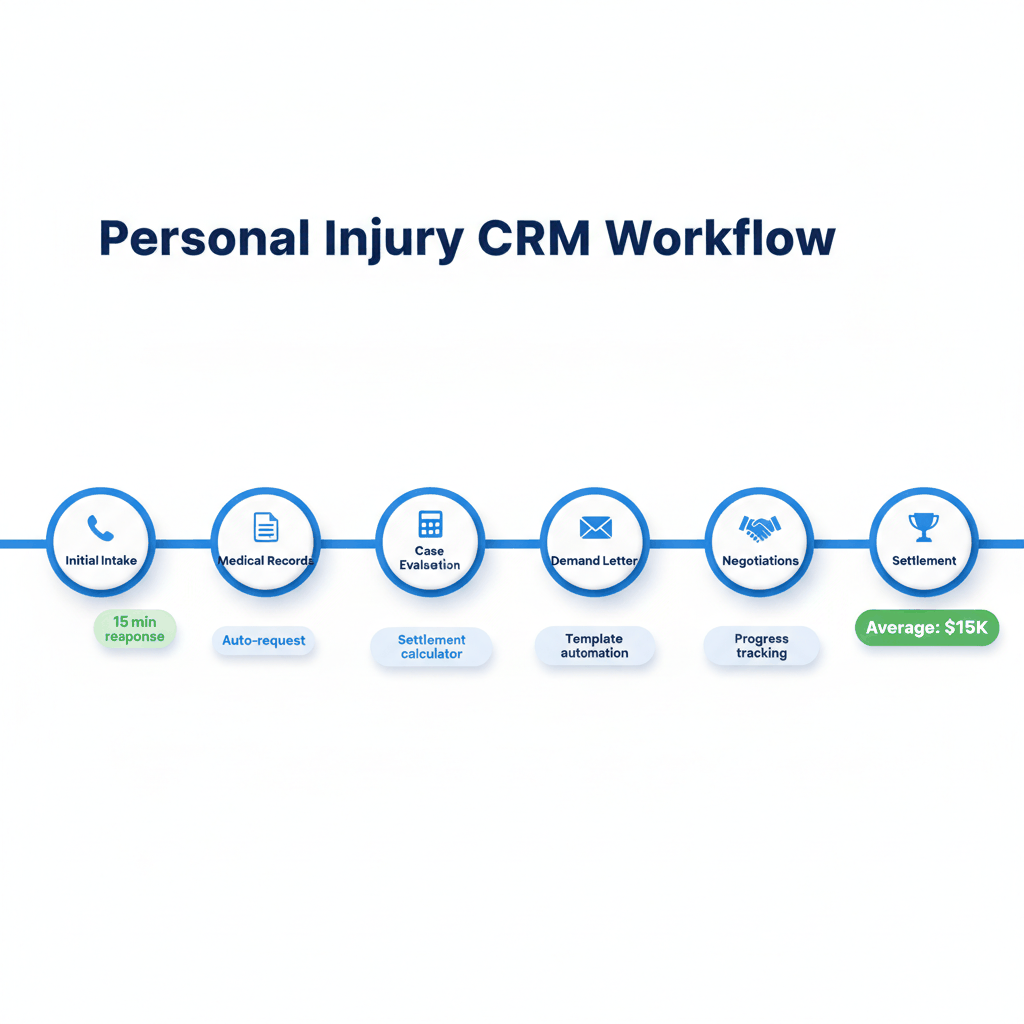
Personal injury clients want regular updates on their cases. Manual communication takes too much time and often gets missed. Automation ensures consistent client contact.
Set up automated check-ins at key milestones. Send updates when medical records arrive, demand letters go out, or settlement negotiations begin. This reduces client anxiety and support calls.
Use templates for common communications but personalize them with case-specific details. Automated doesn't mean impersonal when done correctly.
Personal injury cases involve massive amounts of documentation. Medical records, police reports, insurance correspondence, and expert reports pile up quickly.
Use CRM systems with document automation features. Auto-populate forms with client information. Create document checklists for different case types. Set reminders for missing documentation.
Integrated reporting helps track case progress and identifies bottlenecks. This improves case management efficiency and client satisfaction.
Missing deadlines destroys personal injury cases. Statute of limitations, discovery deadlines, and court dates require careful tracking. Automation prevents costly mistakes.
Set up automatic deadline reminders with multiple alerts. Track settlement negotiations and offers systematically. Use settlement calculators to evaluate offer fairness quickly.
Monitor case values and expenses to identify profitable patterns. This helps with case evaluation and resource allocation decisions.
You can't improve what you don't measure. Track specific metrics to ensure your CRM investment pays off. Focus on metrics that directly impact revenue and client satisfaction.
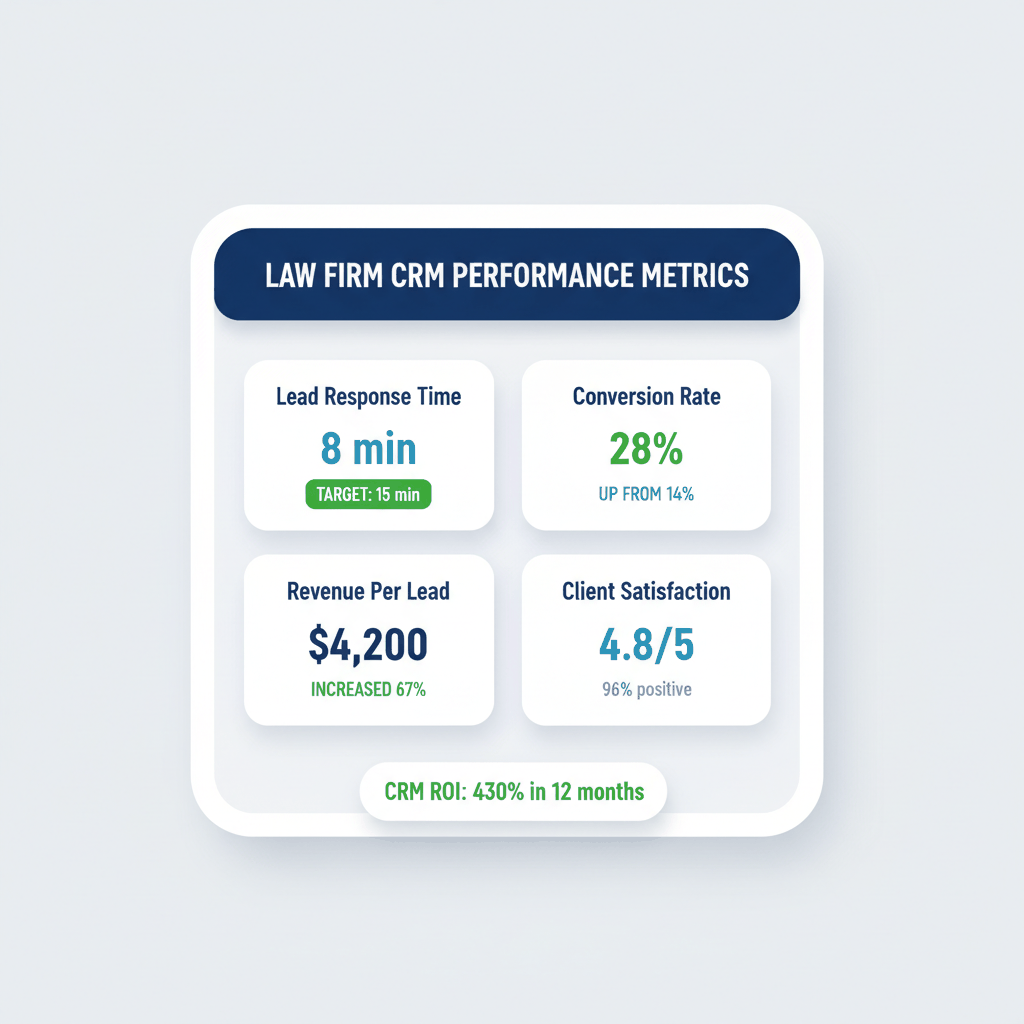
Track lead response time as your most important metric. Aim for under 15 minutes during business hours. Monitor conversion rates from lead to consultation and consultation to client.
Measure client acquisition cost by marketing channel. Calculate lifetime client value to understand profitability. Track referral rates and client satisfaction scores.
For personal injury firms, monitor:
Average case settlement values and timelines
Medical records collection and processing speed
Client communication frequency and satisfaction
Cost per acquired case by marketing source
CRM data helps optimize your marketing budget. Track which channels produce the highest value clients. Focus spending on sources with best ROI.
For example: If Google Ads costs $500 per lead but converts at 25%, while legal directories cost $200 per lead but convert at 8%, Google Ads delivers better value despite higher upfront costs.
Analyze seasonal patterns in lead volume and quality. Adjust marketing spend based on historical data. This improves cash flow and resource allocation.
Track how many team members actively use the CRM system. Low adoption rates indicate training needs or workflow problems. Address issues quickly before they become habits.
Monitor data quality metrics like duplicate records, incomplete profiles, and outdated information. Clean data improves system effectiveness and user confidence.
Regular system health checks prevent small problems from becoming major issues.
How much does law firm CRM software typically cost?
Legal CRM software ranges from $49-$99 per user monthly for most law firms. Implementation and training costs add $500-$10,000 depending on system complexity. Calculate ROI based on improved lead conversion and reduced administrative costs.
What's the biggest mistake MVA attorneys make with CRM implementation?
Trying to implement everything at once overwhelms users and reduces adoption. Start small with clear goals, focus on one practice area, and expand gradually. Proper training and change management are essential for success.
How quickly should personal injury attorneys respond to new leads?
Respond to leads within 15 minutes for maximum conversion rates. Leads contacted within 5 minutes are 21x more likely to convert than those contacted after 30 minutes. Use automated notifications and round-robin assignment for faster response.
Can generic CRM software work for attorney client management?
Generic CRMs lack essential legal features like conflict checks, trust accounting, and matter management integration. They require extensive customization and may not meet compliance requirements. Legal-specific CRM platforms deliver better results with less setup time.
What metrics should law firms track in their CRM system?
Focus on lead response time, conversion rates, client acquisition cost, and lifetime client value. Personal injury firms should also track settlement values, case timelines, and referral rates. Use data to optimize marketing spend and improve profitability.
Ready to buy MVA leads? Sign up for free today with ResultCalls!

Hello everyone! My name is Alex and I write these blogs to help educate small business owners on different ways to grow their business. My goal is to make lead generation as easy as possible for you. After reading these blogs, I hope you leave with some actionable steps that will get you closer to growing your business :)