Your appliance repair website gets tons of traffic. But visitors aren't calling. They're not booking appointments. They're leaving without taking action.
Here's the problem: Most appliance repair websites make critical mistakes that push customers away. Research shows that 83% of consumers research local service businesses online before calling. Your website is their first impression.
These five appliance repair website design mistakes could be costing you hundreds of leads every month. The good news? They're all fixable. Let's turn your website into a lead generation machine.
You'll learn exactly what's wrong with most appliance repair websites. Plus how to fix these problems to get more calls and bookings starting today.
What You'll Learn
Over 50% of appliance repair searches happen on mobile devices. Someone's refrigerator stops working at 9 PM. They grab their phone to find help.
Your website loads. The text is tiny. Buttons are impossible to tap. Your phone number is buried somewhere they can't find.
They leave within seconds.
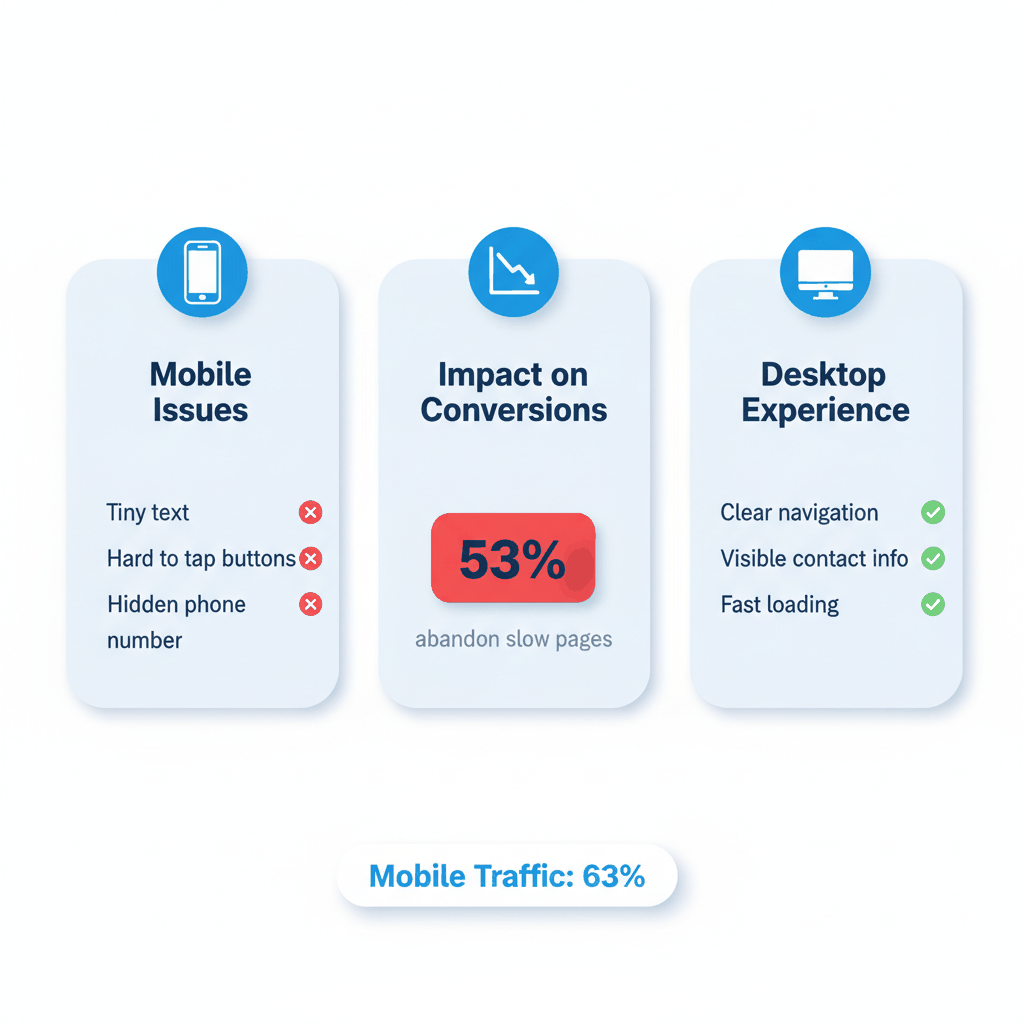
Most appliance repair websites aren't built for mobile users. Mobile traffic now accounts for over 63% of global internet usage. Yet 76% of websites have poor navigation systems.
Here's what happens when your mobile site fails:
Visitors can't tap your phone number easily
Contact forms are too small to fill out
Service area information is hidden
Page elements overlap and look broken
For example: GP Express Appliance Repair transformed their website with mobile-first design. They focused on large tap targets and clear contact information. Result? More local traffic and increased bookings.
Start with responsive design that adapts to any screen size. Make your phone number a large, tappable button on every page. Test your site on different devices weekly.
Use large fonts (at least 16px) and plenty of white space. Design buttons that are easy to tap with a thumb. Keep forms short and simple.
Your mobile site should answer one question fast: "Can you fix my appliance today?"
Speed kills conversions. Google research shows 53% of mobile users abandon pages that take longer than 3 seconds to load.
Your potential customers are dealing with broken appliances. They're frustrated. They need help now.
A slow website tells them you can't solve problems quickly.
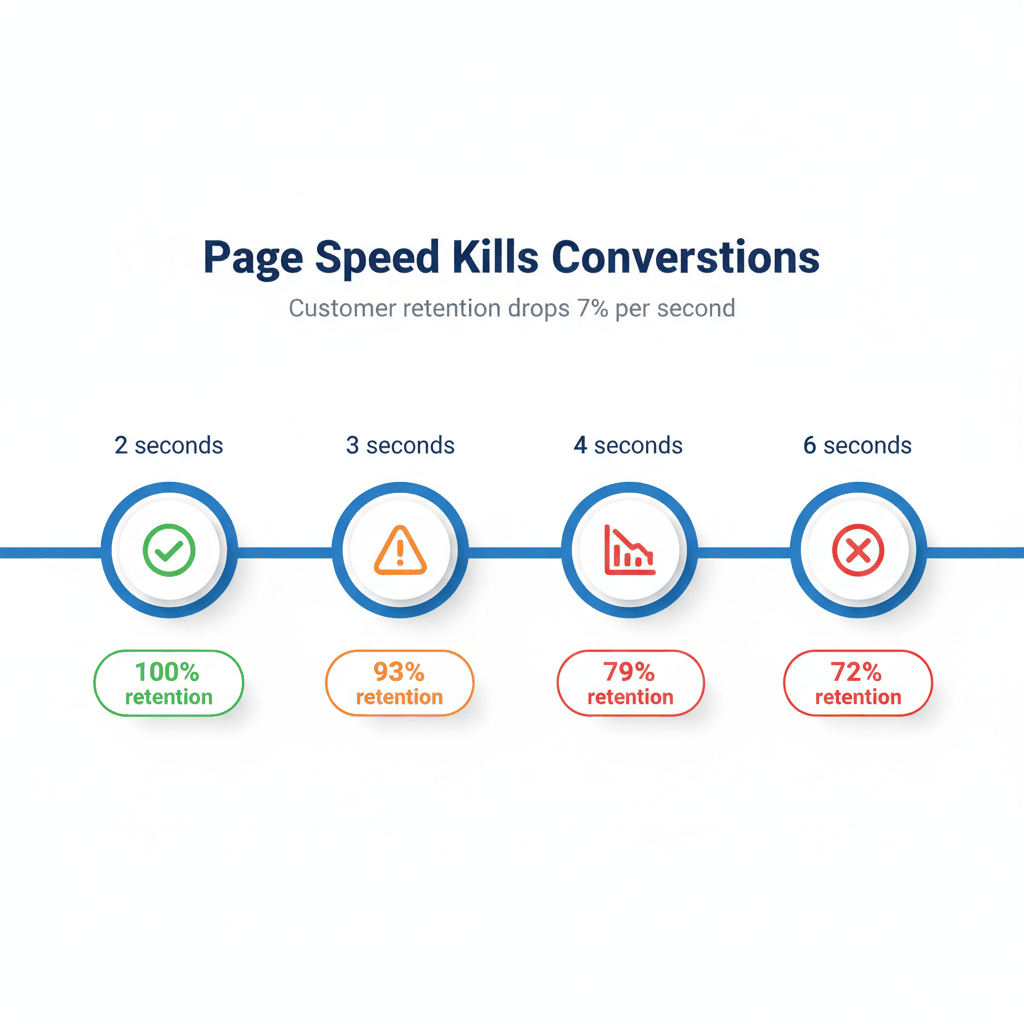
Each additional second of load time reduces conversions by 7%. Think about that. If your site takes 6 seconds to load instead of 2 seconds, you could lose 28% of potential customers.
Common speed killers on appliance repair websites include:
Huge, unoptimized photos of appliances
Too many plugins and widgets
Bloated code and scripts
Poor hosting that can't handle traffic
Users expect websites to load in 2 seconds or less. Anything slower costs you credibility and search rankings.
Compress all images without losing quality. Use tools like TinyPNG or built-in WordPress optimization. Choose fast, reliable hosting designed for business websites.
Remove unnecessary plugins and widgets. Each one adds loading time. Minimize code and use caching to serve pages faster.
Test your site speed monthly. Use Google PageSpeed Insights to identify specific problems. Your goal is under 2 seconds on mobile.
Your contact information should be visible everywhere. Not buried in tiny text at the bottom of pages.
Customers with broken appliances are in a hurry. They want to call someone who can help today. Don't make them hunt for your phone number.
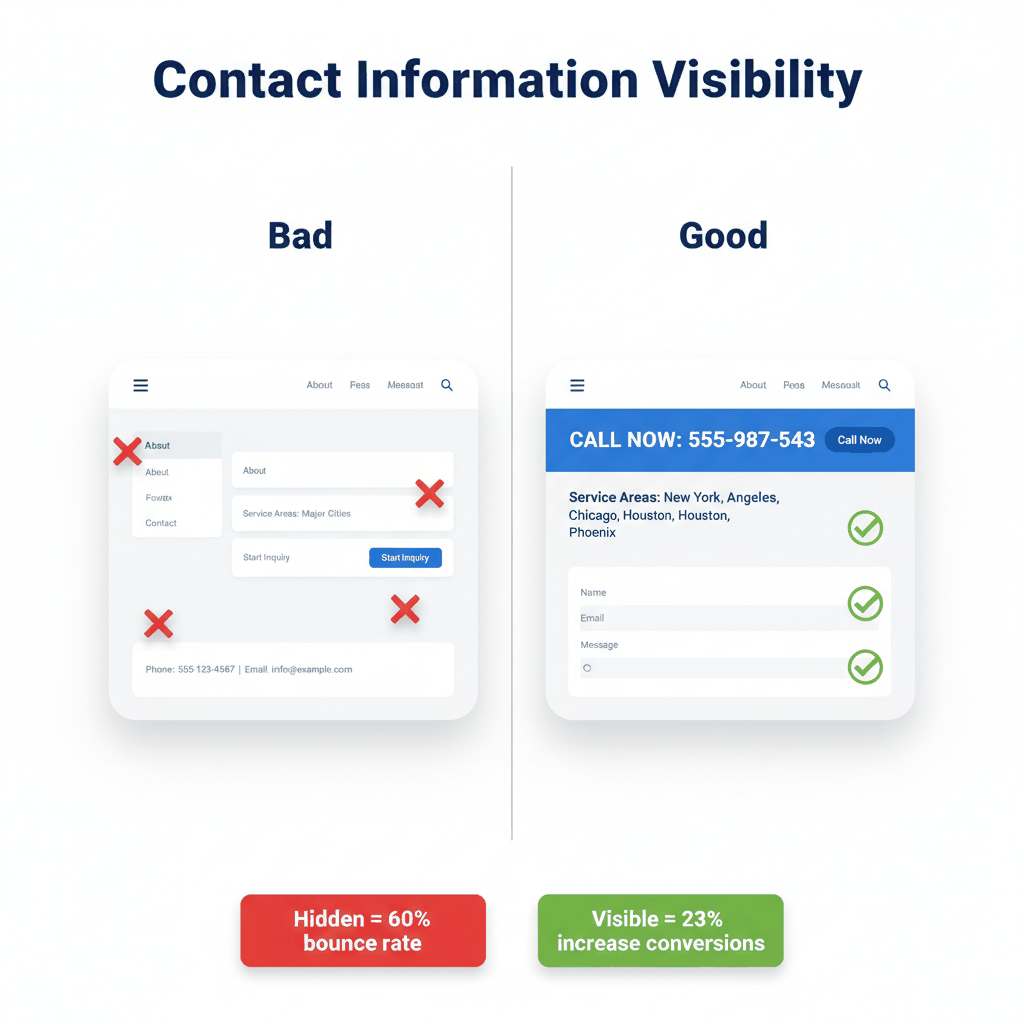
Most appliance repair websites hide critical information:
Phone number only appears in the footer
Service areas mentioned once on an "About" page
Hours of operation buried in small print
Emergency contact info nowhere to be found
A visitor with a broken refrigerator needs to know three things immediately. Do you service their area? Can you come today? What's your phone number?
If they can't find this information in 10 seconds, they'll call your competitor.
Put your phone number in the header of every page. Make it large and tappable on mobile devices. Include a "Call Now" button that works with one tap.
List your service areas prominently. Not just city names, but actual ZIP codes you cover. This helps with local SEO and reduces bounce rates by up to 23%.
Show your hours clearly, especially if you offer emergency repairs. Many appliance problems happen outside business hours.
Add contact forms on multiple pages, but keep them short. Name, phone, problem description, and preferred appointment time. That's it.
Trust is everything in appliance repair. Customers are letting strangers into their homes to fix expensive equipment.
Generic "professional service" language doesn't build trust. Neither do stock photos of smiling technicians who don't work for your company.
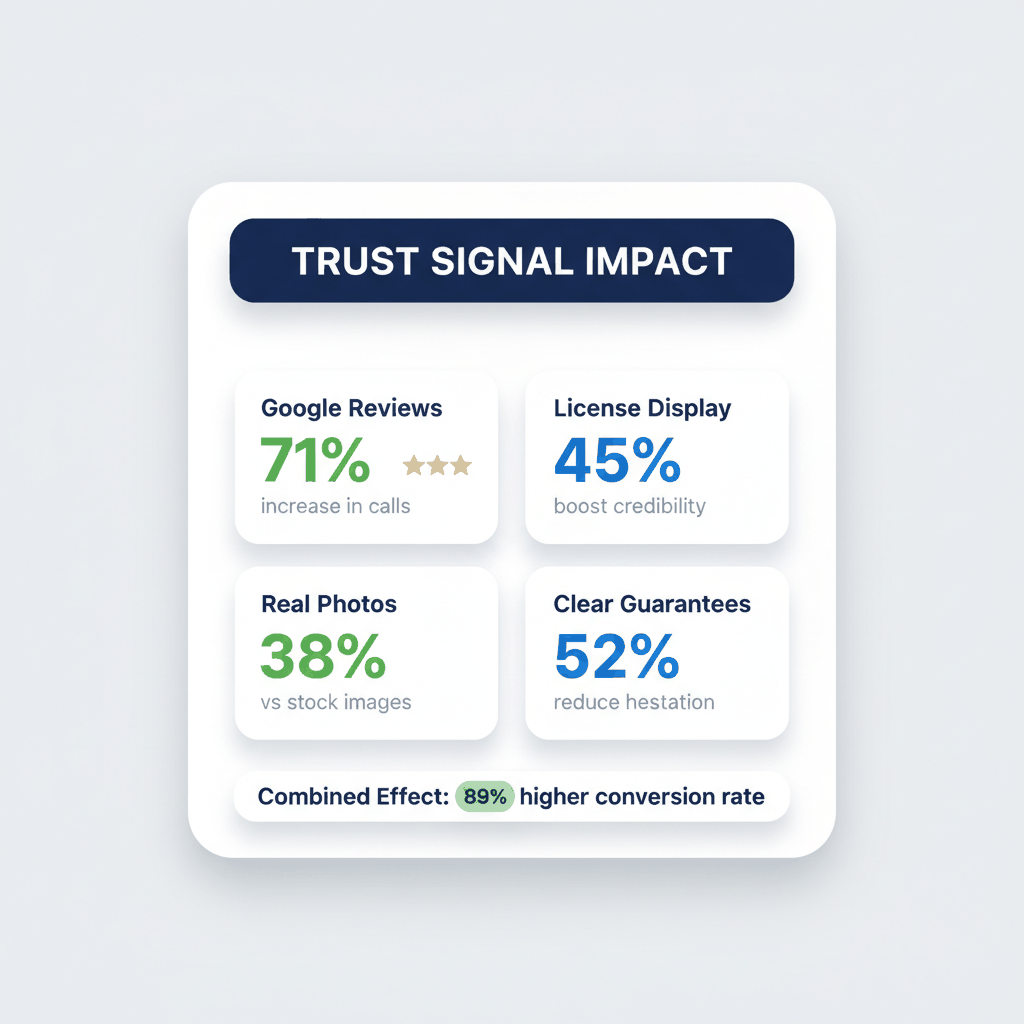
Industry research shows 39% of Americans dispose of broken appliances because they can't find repair services they trust.
Weak trust signals include:
No customer reviews or testimonials
Vague service descriptions without specifics
No photos of actual technicians
Missing licensing and insurance information
No guarantee or warranty details
Customers need proof you're established, reliable, and skilled before they'll call.
Display Google reviews prominently throughout your site. Not just on a reviews page, but integrated into service pages and your homepage.
Use specific, verifiable language: "Serving San Mateo County families since 2007 with 4.8 stars across 237 Google reviews" beats vague "professional appliance repair services."
Show photos of your actual technicians, not stock images. Include brief bios highlighting experience and certifications.
List your licenses, insurance, and any manufacturer certifications. Many customers specifically search for authorized repair services.
Offer clear guarantees on parts and labor. Make your warranty policy easy to find and understand.
Your call-to-action buttons determine whether visitors become customers. Generic phrases like "Learn More" or "Contact Us" don't motivate action.
Effective CTAs for appliance repair websites need urgency and specificity.
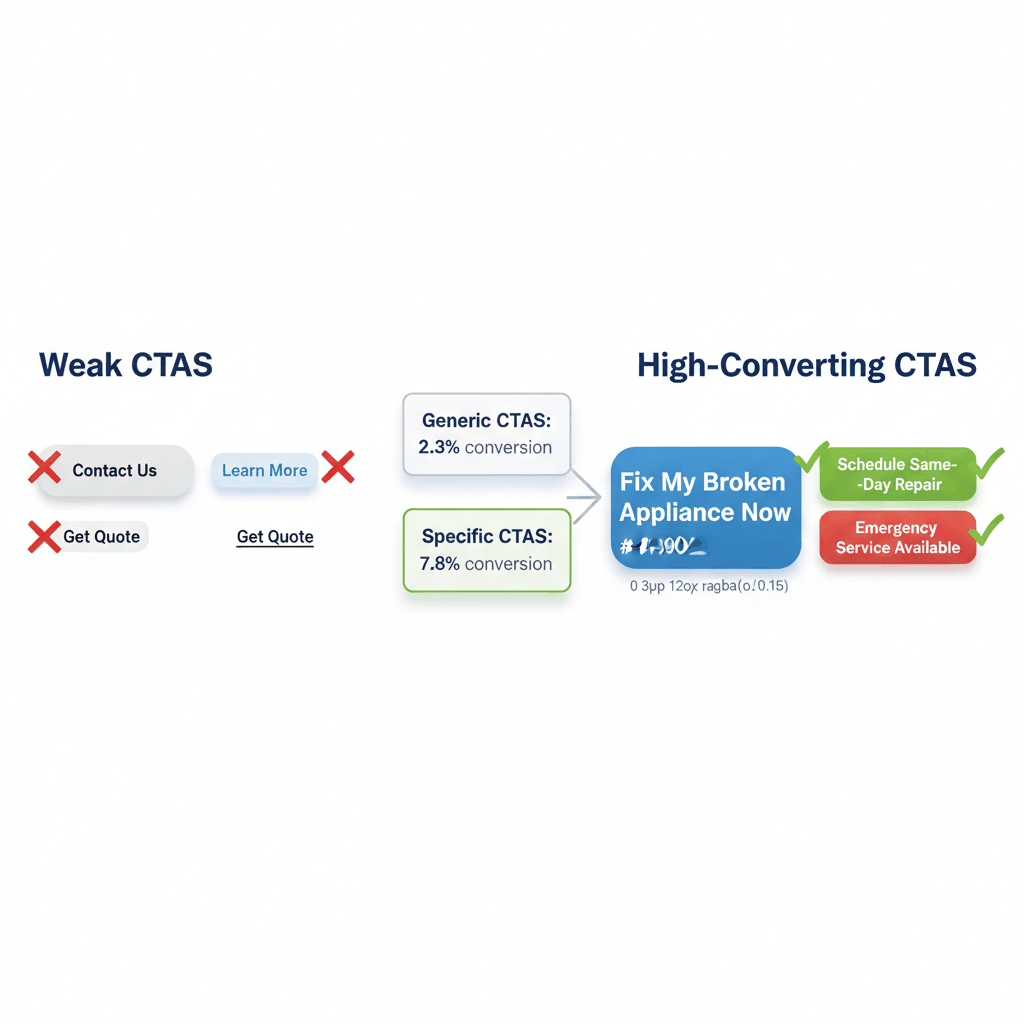
Most appliance repair websites use weak, generic calls-to-action:
"Get in touch" instead of "Get emergency repair today"
Vague "Contact us" instead of "Schedule refrigerator repair"
Buried buttons that blend with the page design
Multiple competing CTAs that confuse visitors
Customers dealing with broken appliances want immediate solutions. Your CTAs should reflect that urgency.
Use action-oriented, specific language. "Schedule Your Refrigerator Repair Today" or "Get Same-Day Appliance Fix" works better than generic phrases.
Make buttons visually distinct with contrasting colors. Test different colors and wording to see what converts best for your audience.
Place primary CTAs above the fold on every page. Secondary CTAs can appear in the content and footer.
Focus on one primary action per page. Too many options create decision paralysis.
For example: Instead of "Learn about our services," try "Fix My Broken Appliance Now." The difference in response rates can be dramatic.
Proven Solutions That Work
These problems might seem overwhelming, but they're all fixable. Here are the specific steps that successful appliance repair companies use to transform their websites.
Start with your mobile design, then scale up to desktop. This ensures your site works perfectly for the majority of visitors.
Use large, tappable buttons (at least 44 pixels). Test forms on actual mobile devices, not just browser tools.
Workiz reports that appliance repair companies using mobile-optimized booking increase conversions by up to 30%.
Compress all images before uploading. Use WebP format when possible for faster loading without quality loss.
Choose hosting designed for business websites. Shared hosting often can't handle traffic spikes when appliances break during storms or power outages.
Remove unused plugins and scripts. Every additional element slows your site.
Create a review collection system. Research shows 71% of consumers leave positive reviews when companies make it easy.
Add customer testimonials to service pages, not just a dedicated reviews section. Context matters more than quantity.
Include licensing numbers and insurance information in your footer. Many customers specifically search for this information before calling.
How important is mobile optimization for appliance repair websites?
Critical. Over 50% of appliance repair searches happen on mobile devices, especially for emergency repairs. A mobile-friendly design directly impacts your ability to capture leads when customers need help most.
What's the ideal loading speed for appliance repair websites?
Under 2 seconds for mobile devices. Each additional second reduces conversions by 7%, and 53% of mobile users abandon pages that take longer than 3 seconds to load.
Where should I place my phone number on my appliance repair website?
In the header of every page, making it large and tappable on mobile. Also include a prominent "Call Now" button above the fold and in your contact forms section.
How many call-to-action buttons should I have per page?
One primary CTA per page to avoid decision paralysis. You can include secondary CTAs lower on the page, but focus visitors on one main action like "Schedule Repair Today."
What trust signals work best for appliance repair conversion?
Google reviews displayed prominently, specific service area coverage, licensing and insurance information, actual photos of technicians, and clear warranty policies. Avoid generic stock photos and vague service descriptions.
Ready to buy appliance repair leads? Sign up for free with ResultCalls today!

Hello everyone! My name is Alex and I write these blogs to help educate small business owners on different ways to grow their business. My goal is to make lead generation as easy as possible for you. After reading these blogs, I hope you leave with some actionable steps that will get you closer to growing your business :)