
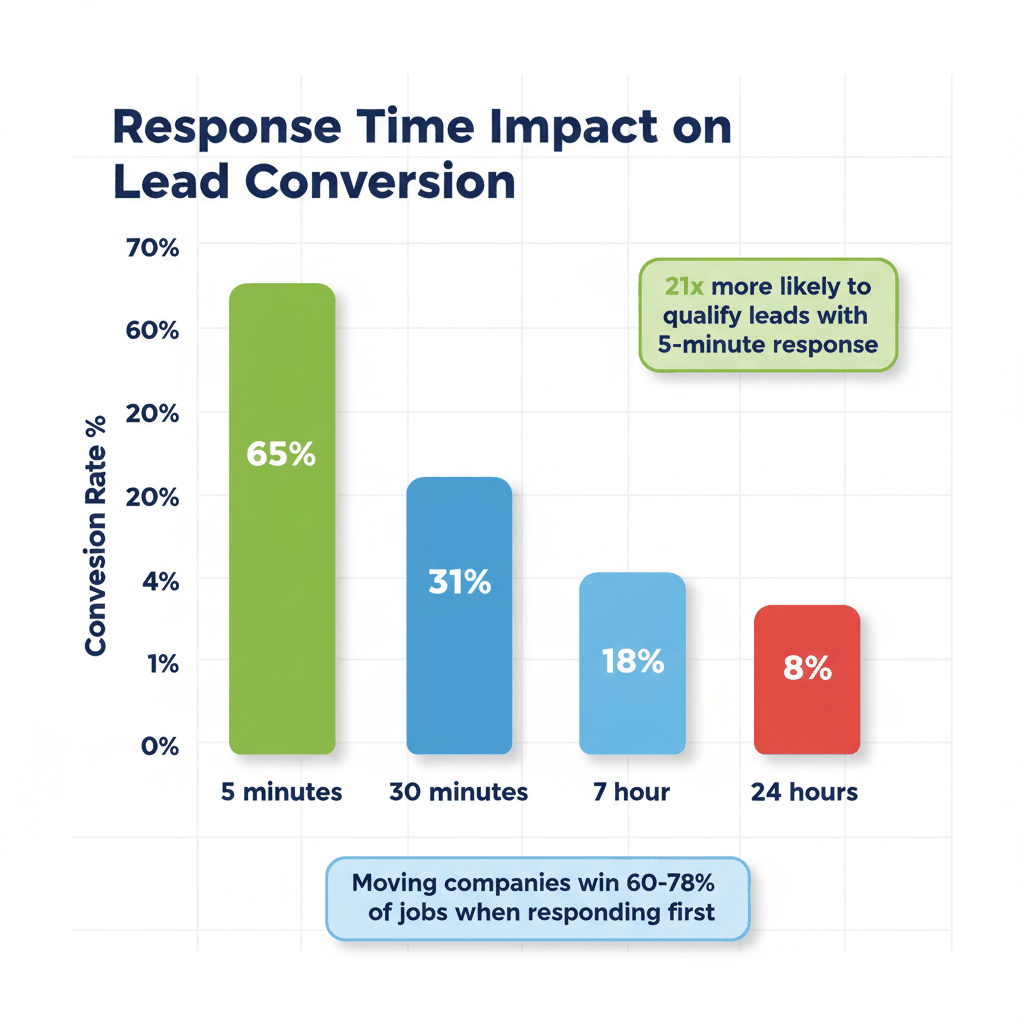
Are you tired of losing moving leads because your team can't respond fast enough? Research shows that moving companies who contact leads within 5 minutes are 21 times more likely to qualify that lead compared to waiting just 30 minutes.
Most moving companies don't have a lead problem. They have a closing problem. If your follow-up is slow, your qualification is superficial, or your reps aren't trained to close, you're leaving thousands of dollars in booked jobs on the table every month.
This guide provides a complete 90-day roadmap to implement a moving company CRM that transforms your business operations. You'll learn how to automate lead response, track your sales pipeline, and boost conversion rates by up to 40%.
What You'll Learn
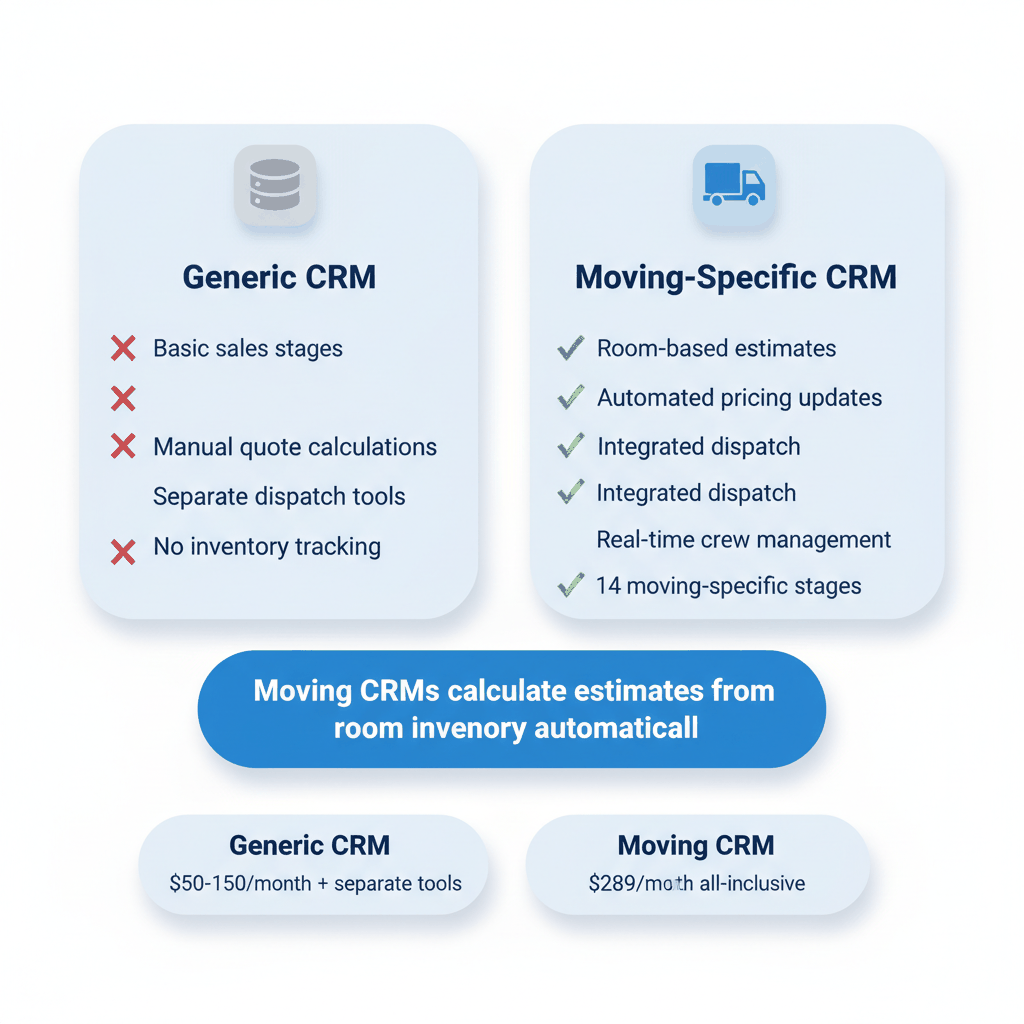
Generic CRMs fail moving companies because they can't handle industry-specific needs. Traditional sales software uses basic stages like "prospect," "qualified," and "closed." Moving companies need 14 moving-specific stages like "quote sent," "survey scheduled," and "deposit collected."
Many moving companies start with Google Sheets or Excel for lead tracking. This works initially. However, hidden costs accumulate quickly with lost leads from rows that get overlooked or accidentally deleted.
Some CRM-only tools charge $50-150 per month. They require separate tools for quoting, dispatch, and invoicing. By the time you add everything up, you're paying $300-600 per month for disconnected tools.
A proper moving company CRM includes these critical features:
Automatic moving estimate calculations based on room inventory
Color-coded pipeline stages for visual sales tracking
Integrated dispatch and crew management
Real-time pricing updates across all systems
Mobile access for field sales teams
Generic CRMs cannot calculate moving estimates based on room inventory, distance, and hourly rates. This requires toggling between the CRM and separate quoting tools. Moving CRMs push bookings directly to dispatch while generic systems require manual re-entry.
The wrong CRM choice costs months of lost productivity and thousands in implementation fees. Here's how to evaluate your options effectively.
SmartMoving is an all-in-one CRM and operations platform designed specifically for moving companies. It combines dispatch, invoicing, customer communication, and reporting. Users praise the industry focus and automation tools for quotes, scheduling, and crew management.
Elromco positions itself as "the only moving CRM built as a single connected system from day one." When customers update inventory, quotes recalculate automatically. Dispatch adjusts in real-time. Crews see changes on their phones instantly. Pricing starts at $289 per month with no setup fees.
QuoteIQ offers the most affordable option. Their pricing for moving companies starts at $29.99 per month. This is 66-92% cheaper than Jobber, Housecall Pro, and ServiceTitan. The Pro plan costs $149.99 per month with no contracts and no hidden fees.
When comparing CRM options, evaluate these automation capabilities:
Multi-step follow-up sequences triggered by specific events
Automatic lead assignment based on territory or rep availability
SMS and email automation, not just one option
Real-time lead notifications to mobile devices
Built-in reporting dashboards for conversion tracking
Mobile access is critical. Sales reps in the field need full CRM functionality on phones. Not stripped-down mobile views, but real functionality for updating lead statuses, sending quotes, and logging calls.
The first 30 days determine your CRM success or failure. Follow this proven roadmap to avoid common implementation mistakes.
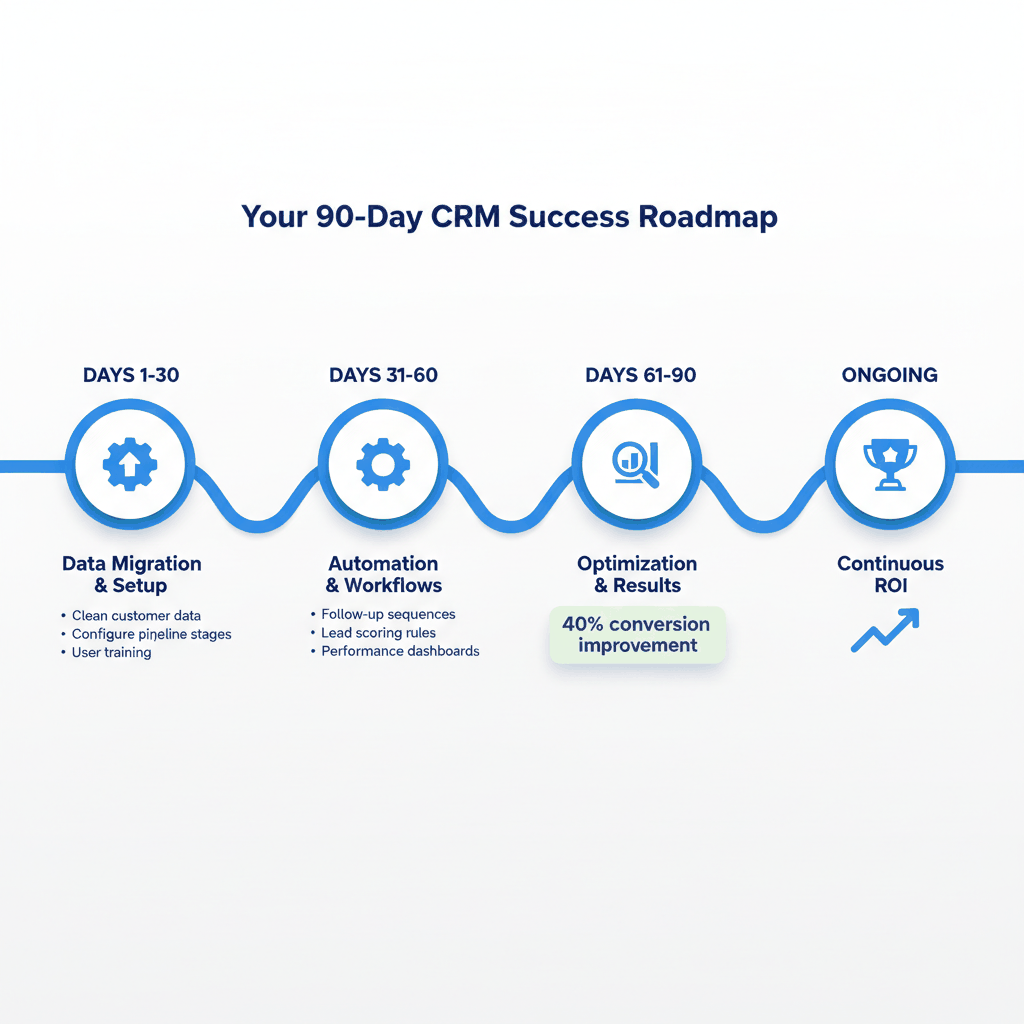
Start by cleaning your existing customer data. Poor data quality alone causes 44% of companies to lose 10% of their annual revenue.
Export your current leads and customers from spreadsheets, old CRMs, or paper files. Remove duplicates, fix phone number formats, and verify email addresses. This foundation work prevents problems later.
Set up your lead sources in the new system. Track where each lead comes from - which website form, advertising campaign, or referral source. This data is essential for optimizing marketing spend.
Configure your moving-specific sales stages. A typical moving company pipeline includes:
New Lead - Initial contact received
Contacted - First conversation completed
Quote Requested - Customer wants pricing
Survey Scheduled - In-home estimate booked
Proposal Sent - Written quote delivered
Follow-Up Needed - Waiting for customer decision
Negotiating - Discussing price or terms
Deposit Collected - Customer committed with payment
Assign color codes to each stage. Green for positive movement, yellow for follow-up needed, red for stalled deals. Your team should see pipeline health at a glance.
Create user accounts for all team members. Set up appropriate permissions. Sales reps need full access to leads and customers. Office staff might only need scheduling and billing access.
Investing in proper training leads to 40% higher ROI on CRM initiatives. Schedule hands-on training sessions using real company data. Don't rely on generic tutorials.
Start with basic automations. Set up automatic lead notifications when new prospects enter your system. Configure email templates for common responses like quote follow-ups and appointment confirmations.
Test your Speed to Lead metrics. For moving companies purchasing leads, the system must pick up leads immediately. Ideally with CRM notifications alerting sales reps and triggering emails and texts automatically.
Month two focuses on automating routine tasks and training your team on advanced features. This is where you'll see productivity gains start to compound.
Automated follow-up sequences keep companies top-of-mind. Instead of reps remembering to follow up on day 3, day 7, and day 14, the system handles it automatically.
Create different sequences for different lead types:
Hot leads who requested immediate quotes
Warm prospects planning future moves
Cold leads who downloaded moving guides
Past customers for repeat business opportunities
For example, when Handled Moving implemented HubSpot, they created weekly consultation workflows that helped them scale from zero to 121 locations. The founder credited automated workflows as "central to tremendous success."
Set up automatic lead assignment based on territory, rep capacity, or lead quality. High-value leads go to your best closers. Routine inquiries can be distributed evenly.
Implement lead scoring based on factors like:
Move distance and estimated job value
Timeline urgency (moving next week vs. next year)
Lead source quality (referral vs. web form)
Customer interaction level (multiple touchpoints vs. single inquiry)
Configure reporting dashboards showing lead volume, conversion rates, revenue by source, average close time, and rep performance. This should be built-in, not require manual spreadsheet analysis.
Track these key metrics weekly:
Lead response time (goal: under 5 minutes)
Conversion rate from lead to booked job
Average deal size and profit margins
Pipeline velocity and stage progression
By day 90, your CRM should be generating measurable business improvements. Here's how to optimize performance and track results.
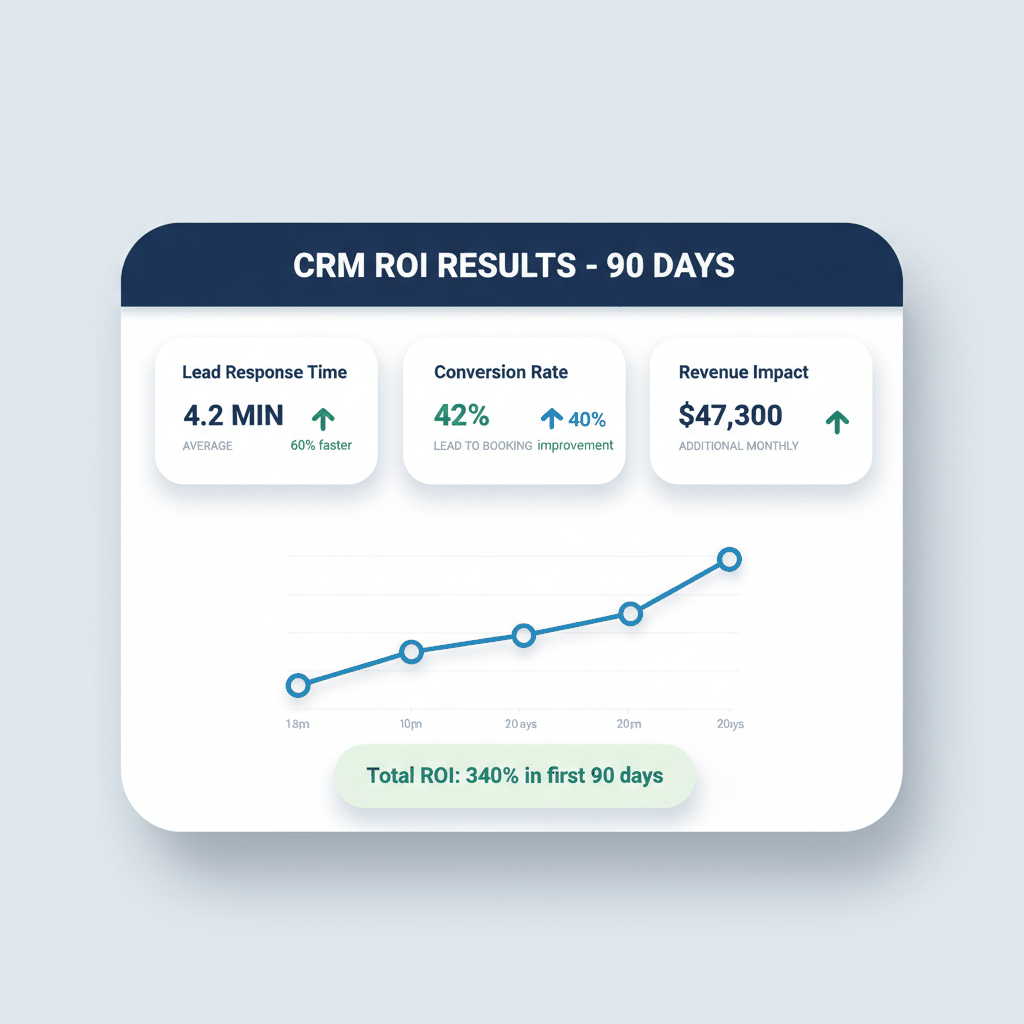
Moving companies using specialized CRM platforms report measurable improvements within weeks of implementation. SmartMoving customers report "We slashed our time for lead-to-booked job by 60%."
Local Muscle Movers boosted revenue by 51% and increased profits 6.5 times over. My Guys Moving & Storage cut a full week of manpower with automated storage and billing.
Conversion rate is the percentage of leads who take important action - scheduling estimates, signing contracts, paying deposits. If 2 out of 10 leads convert into customers, a goal might be to increase this rate to 30% over the next quarter.
AI-powered CRM systems can reduce moving estimate errors by up to 40%. This drastically cuts costly disputes and transforms how moving businesses operate.
Advanced features to implement include:
Predictive lead scoring based on historical data
Automated appointment scheduling with calendar integration
Customer communication insights and sentiment analysis
Dynamic pricing adjustments based on demand and capacity
Calculate your CRM ROI by comparing costs to benefits. Typical benefits include:
Increased conversion rates from faster lead response
Reduced administrative costs from automation
Higher average job values from better sales processes
Improved customer retention from better service delivery
Most moving companies see positive ROI within 90 days when implementation follows proven best practices.
Effective lead management separates profitable moving companies from struggling ones. These practices maximize the value of every lead.
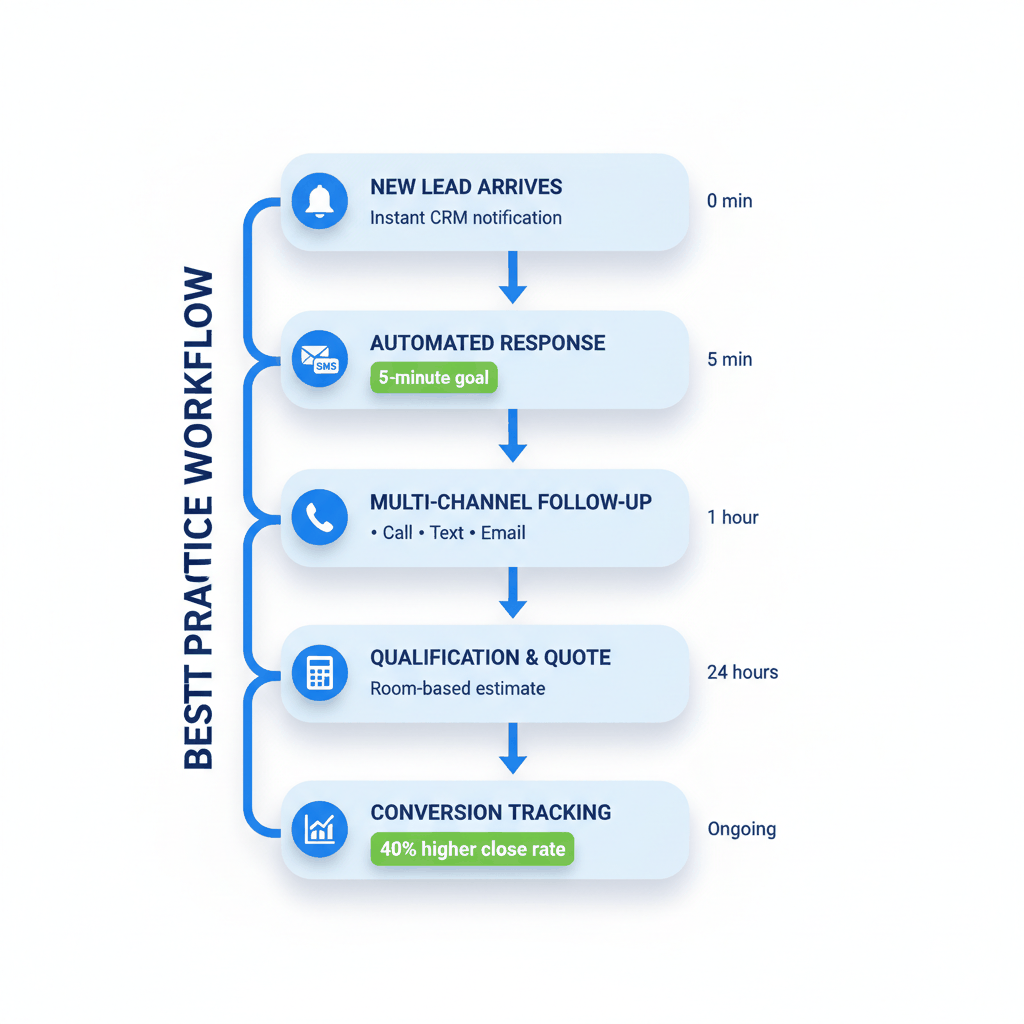
Research consistently shows that the first mover to respond wins the job 60-78% of the time. Conversion chances improve by 8x or more when you follow up within the first 5 minutes.
Implement these speed-to-lead tactics:
Instant SMS notifications to sales reps for new leads
Automatic acknowledgment emails sent immediately
Round-robin assignment to available reps
Escalation rules if first contact isn't made quickly
Don't rely on just phone calls or emails. Use multiple communication channels to reach prospects where they're most responsive.
Effective follow-up includes:
Phone calls for urgent or high-value leads
Text messages for quick confirmations and reminders
Email for detailed quotes and documentation
Social media for relationship building and trust
If you cannot answer "which marketing channel produces our highest-value customers?" you are flying blind. Every CRM should track lead source, reviewed monthly to optimize spend.
According to Move.org, 40% of moving businesses acquire leads online, showcasing the importance of digital customer acquisition strategies. Exclusive leads typically have higher conversion rates than shared leads.
Typical returns on traditional advertising spend are 0.5-2%. The combination of expensive advertising channels with low conversion rates results in high cost per moving lead, with some estimates showing an average $619 cost per lead.
How much does a moving company CRM cost?
Moving company CRM pricing ranges from $29.99 per month for basic plans to $289+ for comprehensive platforms. Compare total costs including quoting, dispatch, and billing features rather than just base CRM prices.
Can I integrate my existing tools with a new moving CRM?
Most modern moving CRMs offer integrations with QuickBooks, Google Calendar, and popular marketing tools. Check integration capabilities before choosing a platform to avoid data silos.
How long does CRM implementation take for moving companies?
Proper moving company CRM implementation takes 90 days for full optimization. Basic setup can be completed in 30 days, but training and automation configuration require additional time for best results.
What's the biggest mistake moving companies make with CRM?
The biggest mistake is choosing generic CRM software that doesn't handle moving-specific workflows. This leads to manual workarounds, poor adoption, and eventual system failure.
How do I measure CRM success for my moving business?
Track lead response time, conversion rates from lead to booked job, average deal size, and pipeline velocity. Successful implementations show 20-40% improvement in conversion rates within 90 days.
Pay per call moving leads are waiting for you! Sign up for free with ResultCalls today!

Hello everyone! My name is Alex and I write these blogs to help educate small business owners on different ways to grow their business. My goal is to make lead generation as easy as possible for you. After reading these blogs, I hope you leave with some actionable steps that will get you closer to growing your business :)