Your phone rings at 2 AM. Another broken garage door spring. The homeowner found your competitor's website first because they made booking easy on mobile. How many leads are you losing to companies that offer instant online scheduling?
The mobile-first booking revolution is reshaping how garage door companies capture customers. Over 60% of searches for home services now happen on mobile devices. Customers expect to book services instantly, get transparent pricing, and schedule appointments without phone tag.
This shift creates a massive opportunity for garage door businesses. Companies implementing mobile-optimized booking systems see significant improvements in lead capture and customer experience. You can capture leads 24/7, reduce missed calls, and turn emergency situations into booked appointments.
This guide shows you exactly how to implement garage door online booking that converts visitors into customers. You'll discover proven strategies that successful companies use to boost their booking rates and revenue.
Table of Contents
Garage door companies face unique challenges when customers try to book services on mobile devices. These problems cost you leads every day.
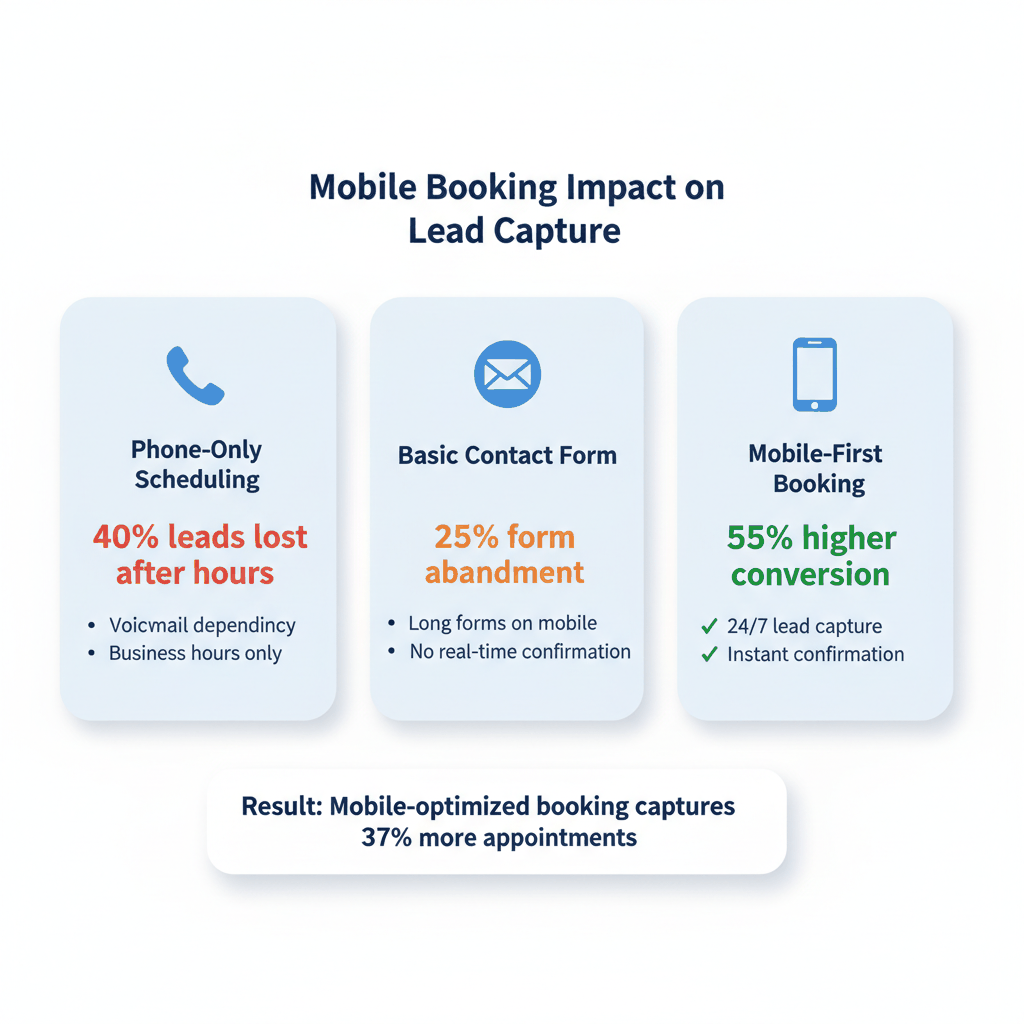
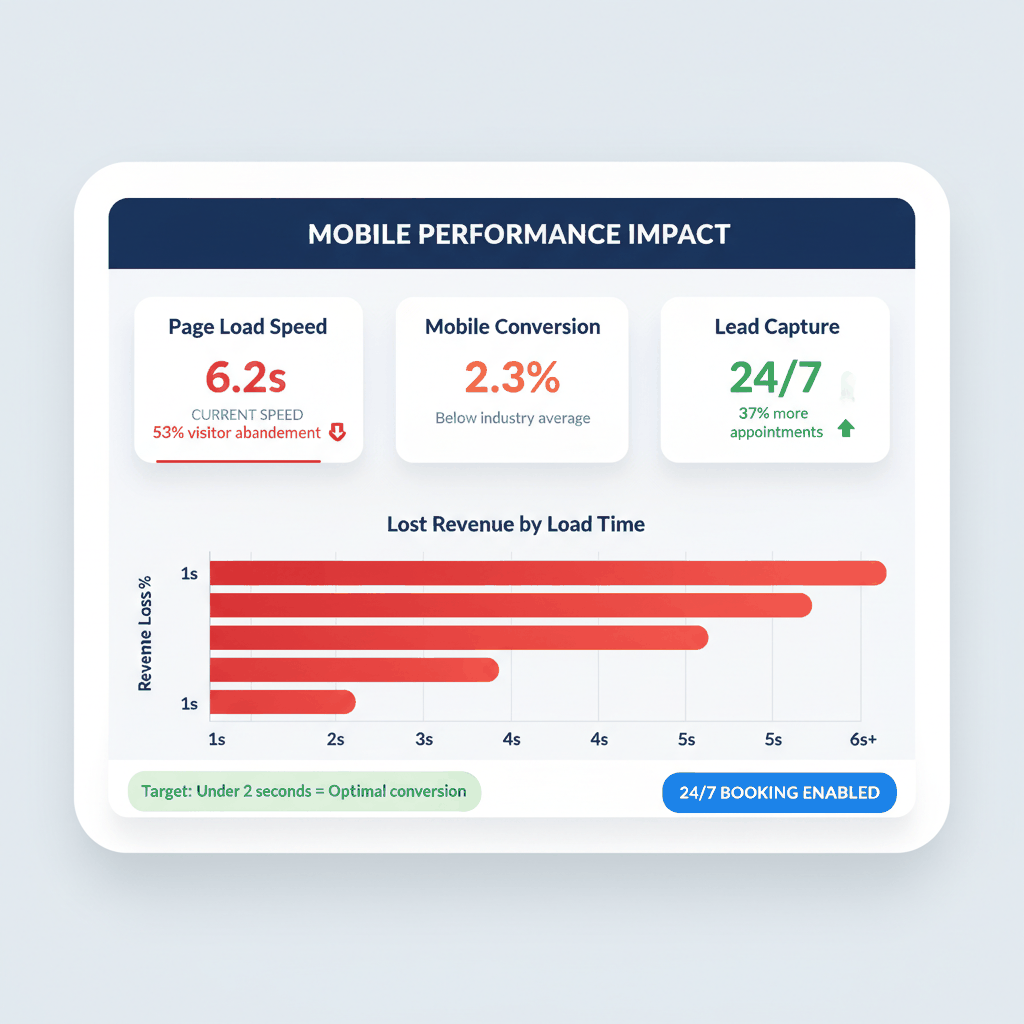
Mobile conversion rates can be 40% lower than desktop when pages aren't optimized. Your mobile site loads slowly. Buttons are too small to tap easily. Forms require too much typing on tiny keyboards.
Here's what happens: A customer's garage door won't open at 7 AM. They search on their phone while running late for work. Your website takes 6 seconds to load. They hit the back button and call your competitor instead.
53% of visitors abandon sites that take longer than three seconds to load. Every second costs you emergency repair leads that convert at the highest rates.
Emergency repairs happen outside business hours. Broken springs, doors stuck open, and malfunctioning openers create urgent situations. These leads convert faster and generate higher revenue than planned maintenance calls.
But many companies still rely on phone-only systems. Your voicemail message says "we'll call you back tomorrow." Meanwhile, customers book with competitors who offer instant online scheduling and same-day service.
Companies with 24/7 online booking capture 37% more appointments than businesses using manual scheduling only.
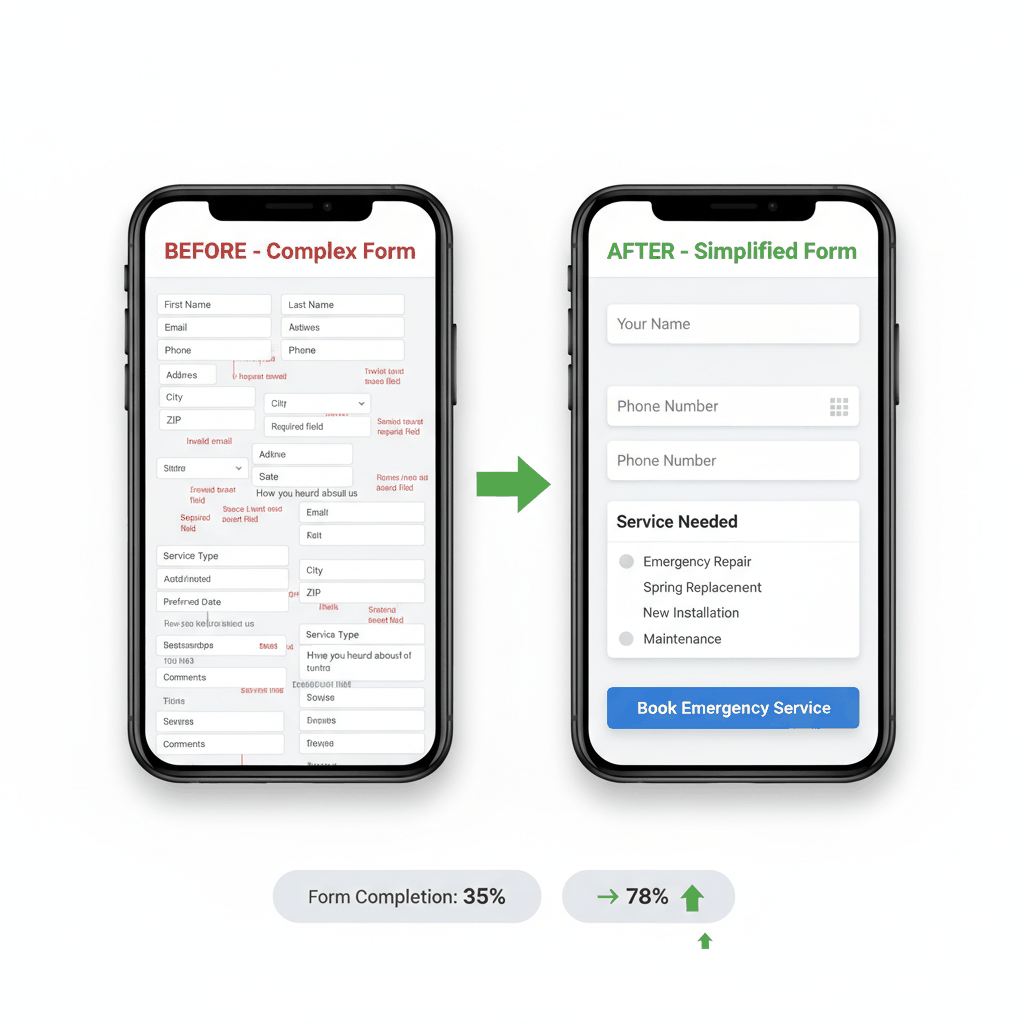
Traditional contact forms ask for everything. First name, last name, email, phone, address, city, state, zip code, garage door type, preferred date, how you heard about us, plus additional comments.
Nobody wants to fill out a job application to fix their garage door. On mobile devices, long forms become even more painful. Auto-correct changes words. Required fields aren't clearly marked. Error messages appear after submission fails.
Companies that simplified their forms saw submission rates increase by 35-55% without spending more on advertising.
Mobile users behave differently than desktop visitors. They make quick decisions. They want immediate solutions. Design your garage door online booking system for mobile first, then adapt for desktop.
On a 5-inch screen, multiple buttons create confusion and tap accuracy problems. Emergency services need one prominent phone button. Planned services need one booking-focused button.
Place your primary call-to-action above the fold. Make it large enough to tap easily with one thumb. Use contrasting colors that stand out against your background. Test different button text to find what converts best.
For example: "Book Emergency Repair" converts better than "Contact Us" for urgent situations. "Schedule Free Estimate" works well for planned installations and maintenance.
Your mobile site must load in under 2 seconds or you lose leads. Optimize images for mobile devices. Minimize code and scripts. Use content delivery networks to serve pages faster.
Core Web Vitals must score green in Google PageSpeed Insights. This affects both user experience and search rankings. Faster sites capture more leads and rank higher in local search results.
Remove unnecessary elements from mobile pages. Focus on essential information: your phone number, service areas, key services, and booking options. Everything else becomes clutter that slows down decisions.
Design for thumb navigation. Place important buttons where thumbs naturally reach. Most people hold phones in their right hand and tap with their thumb.
The bottom third of the screen offers the best thumb access. Top corners are hardest to reach. Size buttons at least 44 pixels tall for easy tapping. Leave white space around clickable elements to prevent accidental taps.
Test your mobile site by using it with one hand while walking. If you can't easily book an appointment while distracted, neither can your customers.
Your appointment scheduling system determines how many leads become paying customers. Optimize every step of the booking process to maximize conversions.
Reduce booking forms to essential information only. Name, phone number, and service type. Everything else can be collected during the appointment or through follow-up communication.
Use dropdown menus for service selection instead of text fields. Options like "Emergency Repair," "Spring Replacement," "New Installation," and "Maintenance" help customers choose quickly. This also helps you prepare the right technician and parts.
Implement conditional logic to show relevant fields based on service selection. Emergency repairs need immediate contact information. Installations can include preferred time ranges and additional details.
Show available appointment times in real-time. Customers want to see open slots immediately rather than waiting for callback confirmation. This creates urgency and reduces scheduling friction.
Highlight same-day availability for emergency services. Many garage door problems require immediate attention. Broken springs create safety hazards. Doors stuck open leave homes vulnerable to weather and security threats.
Block out travel time between appointments automatically. This prevents double-booking and ensures technicians arrive on time. Late arrivals damage customer satisfaction and referral potential.
Provide upfront pricing estimates before appointments when possible. Customers want to know ballpark costs for common services like spring replacement or opener repair.
Create pricing tiers for different service levels. Basic repair visits, comprehensive diagnostics, and emergency after-hours service each have different value propositions and pricing structures.
Transparency builds trust and qualifies leads automatically. Customers who book knowing your pricing are more likely to approve recommended services during the appointment.
Choose the right booking platform to support your garage door business growth. Different solutions work better for different business sizes and service models.
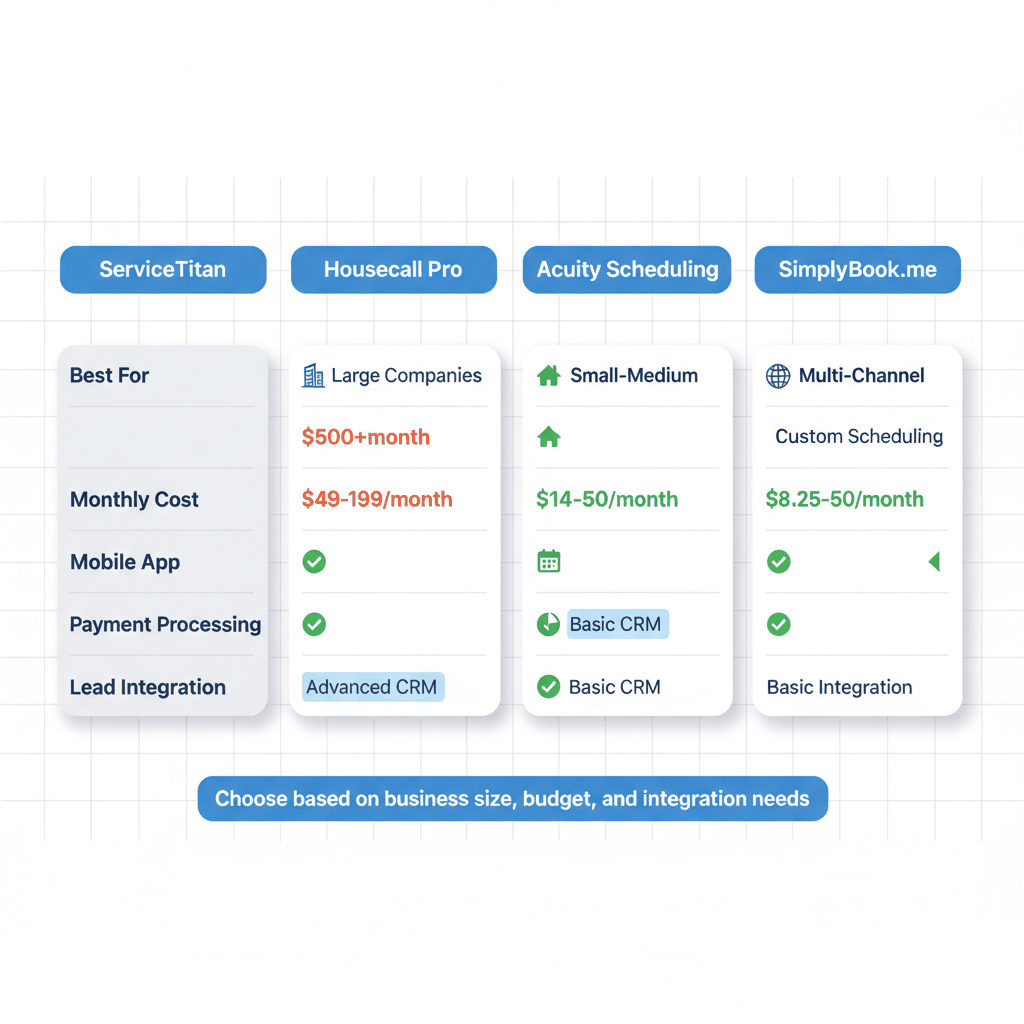
ServiceTitan offers complete business management for larger garage door companies. Customers can book services online, by phone, or via chat. The platform includes estimate building, mobile apps for technicians, and customer management.
Benefits include integrated payment processing, automated follow-up, and detailed reporting. The system handles complex scheduling scenarios and multi-technician dispatching. However, implementation requires significant setup time and monthly costs.
Housecall Pro targets small to medium garage door businesses. The platform combines online booking, payment processing, and customer communication in one system.
The mobile app lets technicians access schedules, update job status, and process payments on-site. Automated reminders reduce no-shows. Customer reviews and referral features help generate new leads.
SimplyBook.me enables booking through multiple channels. Your website, Facebook page, Instagram profile, and direct booking pages all connect to the same scheduling system.
The platform sends automated email, SMS, and telegram reminders to reduce no-shows. Customers can reschedule and cancel appointments online, reducing administrative work for your staff.
Acuity Scheduling offers high customization for service businesses needing detailed scheduling control. You can set different appointment types, pricing, and availability for emergency versus planned services.
Payment integration allows you to collect deposits or full payment during booking. Automated workflows handle confirmation emails, reminders, and follow-up communication without manual intervention.
Liveforce provides 24/7 lead engagement and qualification. The system answers inquiries immediately, even during off-hours, and integrates with popular CRMs like ServiceTitan.
This solution captures leads that would otherwise be lost to voicemail or delayed response times. Qualified leads transfer directly to your scheduling system with customer information and service requirements already collected.
Companies using automated lead engagement see 35% higher conversion rates compared to manual follow-up processes.
Converting website visitors into booked appointments requires systematic optimization. Test and improve every element that affects customer decisions.
Test different button colors, text, and placement to find what converts best for your market. Emergency services typically perform better with red or orange buttons that convey urgency.
Button text should match customer intent. "Fix My Door Now" works for emergency situations. "Schedule Free Estimate" attracts planned project leads. "Check Availability" appeals to customers comparing options.
Size matters for mobile conversion. Make buttons large enough to tap easily but not so large they dominate the screen. Include white space around buttons to prevent accidental clicks.
Display trust signals prominently on mobile devices. Customer reviews, license numbers, insurance information, and years in business all influence booking decisions.
Place review stars and ratings near your phone number and booking button. Include recent review quotes that mention reliability, fair pricing, and quality work.
Show response time guarantees for different service types. "Emergency calls answered in 15 minutes" or "Free estimates within 24 hours" set clear expectations and differentiate your service.
Customize content for local markets. Mention specific neighborhoods, landmarks, and local service areas in your booking forms and confirmation messages.
Local targeting improves conversion rates because customers want nearby service providers. Include estimated arrival times based on location. Show local phone numbers when you serve multiple markets.
Use geolocation features to pre-populate service area information when possible. This reduces form friction while ensuring you only book appointments in your coverage areas.
Emergency garage door repairs generate the highest value leads. Implement systems that capture and convert these urgent situations into booked appointments.
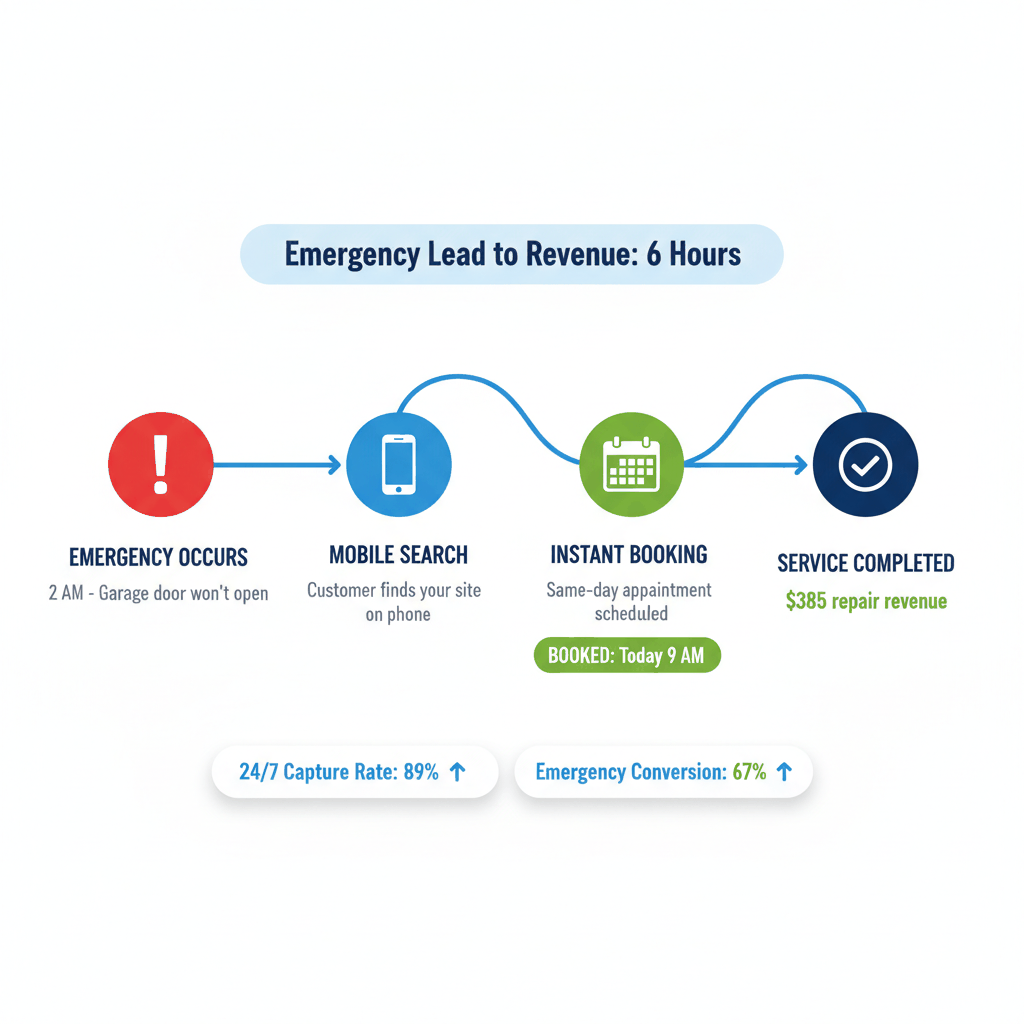
Create separate landing pages for emergency versus planned services. Emergency pages should emphasize immediate response, safety concerns, and same-day availability.
Use urgent language that matches customer mindset. "Garage Door Won't Open? We'll Fix It Today." "Broken Spring? Emergency Repair in 2 Hours." "Door Stuck? Same-Day Service Available."
Include prominent phone buttons for emergency services. Many customers prefer speaking directly with someone during crisis situations. Make sure emergency calls route to available technicians or answering services.
Enable same-day appointment booking for emergency services. This requires real-time calendar integration and clear availability windows throughout the day.
Block emergency slots in your schedule proactively. Reserve 2-3 time slots daily for urgent repairs that book the same day. This prevents conflicts with pre-scheduled maintenance appointments.
Implement priority scheduling for safety-related issues. Doors that won't close properly, broken springs under tension, and electrical problems should take precedence over routine maintenance.
Capture emergency leads outside business hours through automated systems. Use scheduling software that processes bookings immediately and sends confirmation messages.
Set up automated text and email responses for after-hours bookings. Include next-day callback times and emergency contact numbers for true urgent situations.
Monitor after-hours leads closely. Many emergency situations require immediate response, even if the formal appointment is scheduled for the next day.
How does garage door online booking improve lead conversion?
Online booking captures leads 24/7 when customers search outside business hours. It reduces friction by eliminating phone tag and provides instant confirmation. Companies with mobile-optimized booking systems see 35-55% higher conversion rates than phone-only scheduling.
What information should mobile scheduling forms collect?
Keep mobile forms simple: name, phone number, and service type. Complex forms reduce completion rates on small screens. Use dropdown menus for service selection and conditional logic to show relevant fields only.
Which appointment scheduling software works best for garage door companies?
ServiceTitan offers comprehensive solutions for larger businesses. Housecall Pro suits small to medium companies. Acuity Scheduling provides high customization. Choose based on your business size, budget, and integration needs.
How can emergency garage door services improve mobile booking?
Create separate emergency service pages with urgent language and prominent phone buttons. Enable same-day scheduling with real-time availability. Implement after-hours booking systems to capture leads during crisis situations.
What mobile website optimization improves garage door lead generation?
Focus on page speed under 2 seconds, thumb-friendly navigation, and single clear call-to-action buttons. Remove unnecessary elements that slow down decisions. Test all booking processes on actual mobile devices while distracted.
Ready to buy exclusive garage door repair leads? ResultCalls is free to sign up! Start getting calls today!

Hello everyone! My name is Alex and I write these blogs to help educate small business owners on different ways to grow their business. My goal is to make lead generation as easy as possible for you. After reading these blogs, I hope you leave with some actionable steps that will get you closer to growing your business :)